

Deploying in Production
Production Centaur is a Kubernetes deployment with durable API state in Postgres, sandbox pods for agent execution, and iron-proxy for credential injection. The goal is a small working deployment with a clear operator before you add more tools, workflows, harnesses, or overlays.
Production Shape
The API saves threads, runs, and events in Postgres. The Kubernetes backend creates sandbox pods for agent work. iron-proxy handles outbound requests that need credentials:
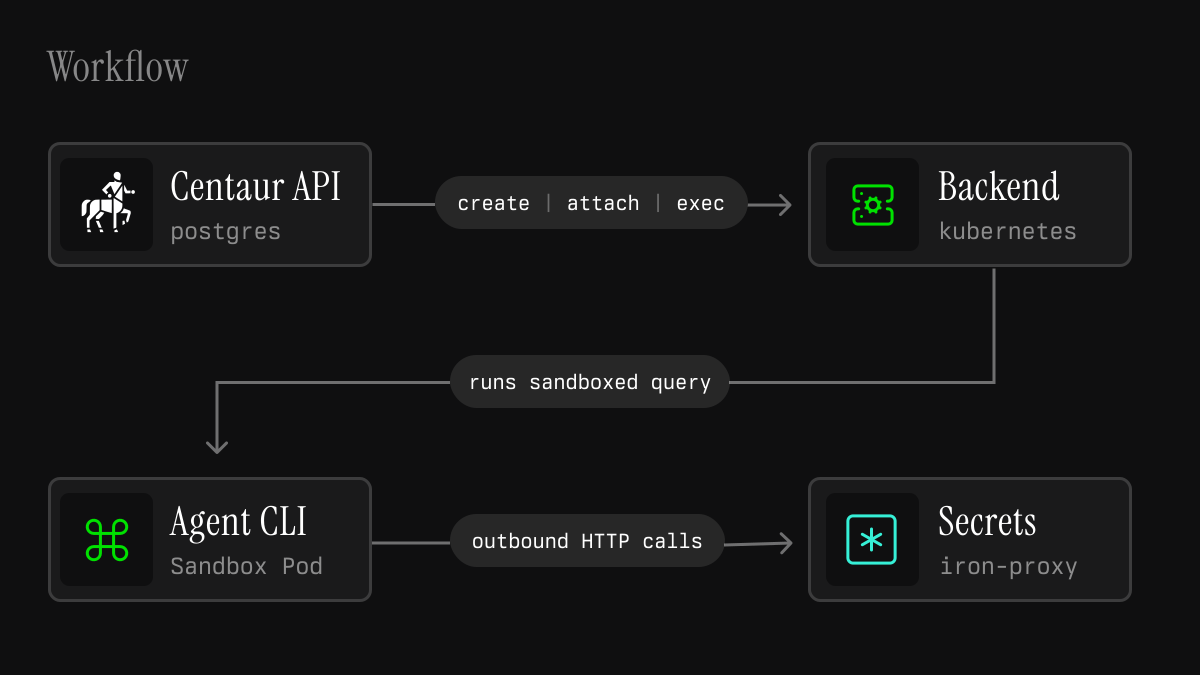
Each pod receives the prompt files, environment, proxy CA, proxy settings, and command it needs for one assigned thread. It should not receive raw model keys or third-party API keys.
1. Choose the Operating Boundary
Before installing, decide:
| Question | Why it matters |
|---|---|
| Who is the operator? | Someone must own secrets, upgrades, incidents, and access reviews. |
| What Slack workspace and channels matter? | Defines the first user and permission boundary. |
| What repos should agents work on? | Determines GitHub token scope and repo cache needs. |
| What tools or data sources matter first? | Keeps setup focused on one useful loop. |
| What is sensitive? | Determines private channels, tool scopes, and review requirements. |
Good first deployments have one narrow engineering, research, support, security, data, or operations workflow where agents can call real tools.
2. Create the Infra Secret
The Helm chart reads infrastructure values from an existing Kubernetes Secret.
By default that Secret is named centaur-infra-env:
secretManager:
  existingSecretName: centaur-infra-env
  envPrefix: ""
For local development, just bootstrap-secrets creates this Secret from your
shell environment. In production, create it through your normal secret delivery
path before installing the chart.
Minimum keys:
| Secret | Required for | Notes |
|---|---|---|
DATABASE_URL | API | Postgres connection string. Make sure the password is URL-encoded. For a managed server, see Use an External PostgreSQL. |
POSTGRES_PASSWORD | Bundled Postgres | Password used when the chart manages Postgres. |
IRON_MANAGEMENT_API_KEY | iron-proxy management API | Generate with openssl rand -hex 32. |
SLACK_BOT_TOKEN | Slackbot/API | Bot User OAuth Token from the Slack app. |
SLACK_SIGNING_SECRET | Slackbot/API | Used to verify Slack webhook signatures. |
SLACKBOT_API_KEY | Slackbot to API | Dedicated static service token restricted to Slack session routes and workflow event emission. |
CENTAUR_APIRS_ADMIN_API_KEY | Optional administrator access to API | Static bearer token with every api-rs capability. Generate with openssl rand -hex 32, store it in the infra Secret, and keep it distinct from all ingress keys. |
OP_CONNECT_TOKEN | iron-proxy 1Password Connect source (preferred) | Needed when ironProxy.secretSource is onepassword-connect. |
OP_SERVICE_ACCOUNT_TOKEN | iron-proxy 1Password service-account source | Needed when ironProxy.secretSource is onepassword. |
OP_VAULT | iron-proxy 1Password source | Vault name or id used for op:// references (either mode). |
The Centaur Console is the permission control plane and is a required chart component. Add these keys to the same infra Secret:
| Secret | Required for | Notes |
|---|---|---|
IRON_CONTROL_DATABASE_URL | Console database | May use the bundled Postgres server. Keep the Console in its own logical database. |
IRON_CONTROL_INITIAL_USER_EMAIL | Initial Console admin | Used only to create the first user when no user exists. |
IRON_CONTROL_INITIAL_USER_PASSWORD | Initial Console admin | Minimum 12 characters. Use a generated break-glass password. |
IRON_CONTROL_INITIAL_API_KEY | api-rs and centaur-perms | Must be iak_ followed by 64 lowercase hexadecimal characters. |
IRON_CONTROL_AR_ENCRYPTION_PRIMARY_KEY | Console encryption at rest | Generate a long random value and keep it stable. |
IRON_CONTROL_AR_ENCRYPTION_DETERMINISTIC_KEY | Console encryption at rest | Generate a separate long random value and keep it stable. |
IRON_CONTROL_AR_ENCRYPTION_KEY_DERIVATION_SALT | Console encryption at rest | Generate a separate long random value and keep it stable. |
IRON_CONTROL_SECRET_KEY_BASE | Console sessions and signing | Generate at least 64 random bytes. |
CENTAUR_JWT_SIGNING_SECRET | Console-issued MCP, Console service, and sandbox api-rs tokens | Generate at least 64 random bytes. Console mints its own purpose-bound service JWT from this existing signing secret. |
The bootstrap user is created only when the Console has no users. Do not rotate the ActiveRecord encryption keys as an ordinary credential rotation: existing encrypted records become unreadable without an explicit key-migration plan.
Generate distinct high-entropy values for each enabled ingress service key. Store them in the infra Secret. api-rs rejects duplicate configured tokens at startup.
3. Configure Harness Credentials
Store one secret per enabled harness credential:
| Harness | API value | Slack selector | Credential to store | Upstream |
|---|---|---|---|---|
| Codex default | codex | none or --codex | OPENAI_API_KEY | api.openai.com |
| Codex with OpenRouter provider | codex | none or --codex | OPENROUTER_API_KEY | openrouter.ai |
| Codex with Meta AI direct | codex | --meta | META_AI_API_KEY | api.ai.meta.com |
| Codex with a custom provider | codex | --provider <id> | Provider apiKeyEnv | Provider baseUrl host |
| Amp | amp | --amp | AMP_API_KEY | ampcode.com |
| Claude Code | claude-code | --claude | ANTHROPIC_API_KEY | api.anthropic.com |
sandbox.harnessEngine and the selectors above apply when a session is created.
A session records its harness and keeps it for the life of the thread, so
changing the chart value does not move existing threads onto another harness.
Start a new thread to pick one up.
In normal sandbox mode, containers receive placeholder values such as
OPENAI_API_KEY=OPENAI_API_KEY. iron-proxy swaps the
placeholder for the real key on outbound requests, only on the hosts and
headers the secret is bound to.
When ironProxy.secretSource is onepassword, iron-proxy resolves these values
from op://$OP_VAULT/<SECRET_NAME>/credential. For example, store the default
Codex credential in a 1Password item named OPENAI_API_KEY. To run Codex
through OpenRouter, store OPENROUTER_API_KEY and set OPENROUTER_MODEL to a
model slug such as openrouter/auto, or set CODEX_MODEL_PROVIDER=openrouter
alongside CODEX_MODEL. Per-turn Codex model overrides with provider-style
slugs such as --model anthropic/claude-fable-5 also select the OpenRouter
provider even when OPENROUTER_MODEL is unset.
To run Codex through Meta AI direct, store META_AI_API_KEY and select the
provider with --meta. Pair it with --model <model-id> when choosing a
provider-specific model for a turn.
To register a private OpenAI-compatible Responses provider, add it once under
codex.customProviders:
codex:
  customProviders:
    private_responses:
      name: Private Responses
      baseUrl: https://inference.example.com/v1
      apiKeyEnv: PRIVATE_RESPONSES_API_KEY
      defaultModel: example-model
Store the named key in the configured iron-proxy secret source. The chart sends
the non-secret provider catalog to api-rs, sandboxes, chat ingresses, and the
Console. api-rs registers a bearer-token replacement restricted to the
baseUrl DNS host; sandboxes receive only the apiKeyEnv placeholder. Select
the provider with --provider private_responses; --model overrides its
configured default for that turn. If defaultModel is omitted, callers must
pass --model; the Console lists only custom providers that define a default.
The backing vault can be shared across the deployment, but access is not. The
Centaur Console grants each user, channel, issue, or workflow principal only
the roles and secrets it should use. The infra role is assigned to new
principals by default so they can run a model harness. Tool credentials are
separate and should be granted deliberately. Configure that baseline in
Advanced Permissioning.
Codex Auth Modes
Codex supports two authentication modes, selected per deployment with
sandbox.codexAuthMode in the chart values. api-rs reads the resulting
CODEX_AUTH_MODE env var to register the matching proxy credential with the
console and propagates it into each sandbox, so the agent's auth.json and
the injected credential always agree. Do not set CODEX_AUTH_MODE through
sandbox.extraEnv: that reaches sandbox pods but not api-rs, which is the
component that acts on the mode.
| Mode | Upstream | Credentials required |
|---|---|---|
api_key (default) | api.openai.com | OPENAI_API_KEY in the secrets backend |
access_token | chatgpt.com | OPENAI_CODEX_ACCOUNT_ID in the secrets backend, plus the openai-codex broker credential in the console |
access_token mode routes Codex through a ChatGPT account rather than a raw
API key. The console owns the refresh token as the openai-codex broker
credential: its background worker refreshes it and mints short-lived access
tokens, which the per-sandbox proxy injects on outbound requests so the
sandbox never sees them. The refresh token is stored encrypted in the
console's own database. It is not read from or synced to your secrets
backend.
The commands below assume you are at the root of a Centaur checkout and have
configured IRON_CONTROL_URL and IRON_CONTROL_API_KEY as described in
Configure the Operator CLI.
To bootstrap access_token mode:
-
Log in locally with the dedicated ChatGPT account and force this login to use a file-backed credential store:
codex login -c 'cli_auth_credentials_store="file"'
CODEX_AUTH_FILE="${CODEX_HOME:-$HOME/.codex}/auth.json"
export OPENAI_CODEX_ACCOUNT_ID="$(jq -er '.tokens.account_id' "$CODEX_AUTH_FILE")"
export OPENAI_CODEX_REFRESH_TOKEN="$(jq -er '.tokens.refresh_token' "$CODEX_AUTH_FILE")"
The credential-store override is intentional. Codex can otherwise use the operating system keyring, which leaves no
auth.jsonfile to read. -
Store
OPENAI_CODEX_ACCOUNT_IDin your secrets backend (1Password vault, Kubernetes Secret, etc.). iron-proxy injects this ChatGPT account UUID as thechatgpt-account-idheader so the backend routes to the right workspace. -
Create the broker credential with the refresh token from the same login:
cargo run --manifest-path services/api-rs/Cargo.toml -p centaur-perms -- \
  broker create --foreign-id openai-codex \
  --token-endpoint https://auth.openai.com/oauth/token \
  --client-id app_EMoamEEZ73f0CkXaXp7hrann \
  --refresh-token "$OPENAI_CODEX_REFRESH_TOKEN"
unset OPENAI_CODEX_REFRESH_TOKEN
The client id is the Codex CLI's fixed, publicly known OAuth client id: the same for every Codex install; it is passed here, not stored in the secrets backend.
-
Start (or restart) api-rs. At startup it registers the access-token fragment with the console; if the
openai-codexbroker credential does not exist yet, the console rejects the registration with a 422 and api-rs fails fast, so create the credential first.
Claude Auth Modes
Claude Code supports two authentication modes, selected per deployment with
sandbox.claudeCodeAuthMode in the chart values. It has the same contract as
sandbox.codexAuthMode above: api-rs registers the matching proxy credential
and propagates CLAUDE_CODE_AUTH_MODE into each sandbox, so do not set the
env var through sandbox.extraEnv.
| Mode | Upstream | Credentials required |
|---|---|---|
api_key (default) | api.anthropic.com | ANTHROPIC_API_KEY in the secrets backend |
access_token | api.anthropic.com | the anthropic-claude broker credential in the console |
access_token mode routes Claude Code through a Claude.ai Pro or Max
subscription rather than a raw API key. The console owns the refresh token as
the anthropic-claude broker credential and mints short-lived access tokens,
which the per-sandbox proxy injects as the Bearer on outbound requests so the
sandbox never sees them. The sandbox entrypoint plants a dummy
~/.claude/.credentials.json so the CLI emits OAuth-shaped requests; the
proxy overwrites the Bearer at request time. This mode needs no
secrets-backend items.
The commands below assume you are at the root of a Centaur checkout and have
configured IRON_CONTROL_URL and IRON_CONTROL_API_KEY as described in
Configure the Operator CLI.
To bootstrap, run claude login locally with the dedicated Claude.ai
account, then export the refresh token. On systems where Claude Code writes a
credentials file, run:
export CLAUDE_CODE_REFRESH_TOKEN="$(
  jq -er '.claudeAiOauth.refreshToken' "$HOME/.claude/.credentials.json"
)"
If Claude Code used the macOS keychain instead, run:
export CLAUDE_CODE_REFRESH_TOKEN="$(
  security find-generic-password -s 'Claude Code-credentials' -w |
    jq -er '.claudeAiOauth.refreshToken'
)"
Create the broker credential from the root of the checkout:
cargo run --manifest-path services/api-rs/Cargo.toml -p centaur-perms -- \
  broker create --foreign-id anthropic-claude \
  --token-endpoint https://platform.claude.com/v1/oauth/token \
  --client-id 9d1c250a-e61b-44d9-88ed-5944d1962f5e \
  --refresh-token "$CLAUDE_CODE_REFRESH_TOKEN"
unset CLAUDE_CODE_REFRESH_TOKEN
The client id is Claude Code's fixed, publicly known OAuth client id. As with Codex, api-rs fails fast at startup if the broker credential is missing.
4. Configure Advanced Permissioning
Set console.publicUrl and configure console.ingress if operators need to
reach the Console outside the cluster. Sign in as the bootstrap admin, then
open System Settings before creating user sessions:
- Keep
infraas a default role if every admitted user may run an agent. - Clear default roles if even harness access must be explicitly approved.
- Set default repo-cache access to
none,public, orall. - Decide whether new sandboxes may reach observability and the api-rs control plane.
Defaults apply only to principals created later. After users or channels start
their first session, assign tool roles or direct secret grants from
Principals. For automated provisioning, use centaur-perms with the same
secret-source policy and tool directories as api-rs.
Follow Advanced Permissioning for principal mapping, tool registration, role design, revocation, and end-to-end verification.
5. Configure Slack
Create the Slackbot app at api.slack.com/apps.
Use the app page to install the bot, copy the Bot User OAuth Token for
SLACK_BOT_TOKEN, and copy the Signing Secret for SLACK_SIGNING_SECRET.
- Add the bot scopes required by the Slackbot features you enable.
- Install the app to the workspace.
- Store the Bot User OAuth Token as
SLACK_BOT_TOKEN. - Store the app Signing Secret as
SLACK_SIGNING_SECRET. - Enable Event Subscriptions.
- Set the Request URL to
https://<your-host>/api/webhooks/slack. - Subscribe to
app_mentionand to the message events you want Centaur to see:message.channels,message.groups, andmessage.im. To automatically join newly-created public channels, setslackbotv2.autoJoinCreatedChannelstotrueand subscribe tochannel_created. For Slack agent view, complete the Slack app migration and setslackbotv2.agentViewEnabledtotrue. The toggle defaults tofalse. Leaveagent_session_stoppedunsubscribed until native Stop handling is implemented. - Enable Interactivity and set its Request URL to the same
https://<your-host>/api/webhooks/slackURL. Block Kit actions are emitted to the workflow engine asslack.block_action.<action_id>events.
The Slackbot normalizes Slack app_mention and message events plus
block_actions interactions. When SLACKBOTV2_AUTO_JOIN_CREATED_CHANNELS is
enabled, it also joins newly-created public channels from subscribed
channel_created events. The Slack app needs channels:read to receive those
events and channels:join for the auto-join behavior. Do not rely on
assistant-specific Slack event types unless the Slackbot code has explicit
support for them.
Do not put Centaur API-key auth in front of /api/webhooks/slack; the Slackbot
validates Slack's signature and then calls the Centaur API separately.
The Slackbot accepts Slack events at /api/webhooks/slack. It also registers
compatibility paths for /api/slack/events, /api/slack/actions,
/api/slack/options, and /api/slack/commands.
For Slack Connect channels, follow Enable Centaur for External Slack Channels before adding Centaur to the channel.
6. Deploy With Helm
The chart lives at contrib/chart. Select service images, iron-proxy secret
source, sandbox image, and optional runtime class in your values file:
secretManager:
  existingSecretName: centaur-infra-env
  envPrefix: ""

api:
  executionWorkerEnabled: true
  warmPoolEnabled: true

ironProxy:
  secretSource: onepassword-connect
  secretTtl: 10m

apiRs:
  # Delete any sandbox older than this, running or suspended.
  sandboxMaxLifetimeSecs: 259200

onepasswordConnect:
  connect:
    create: true
    credentialsName: centaur-onepassword-connect-credentials
    credentialsKey: 1password-credentials.json

sandbox:
  image:
    repository: centaur-agent
    tag: latest
    pullPolicy: IfNotPresent
  runtimeClassName: gvisor
The Kubernetes sandbox backend is the only runtime backend.
Sandbox lifecycle has two separate timers:
- Slackbot v2 sends
idle_timeout_mson execute requests, defaulting to up to 3 hours, so api-rs can pause an idle sandbox after a turn finishes. - api-rs deletes old sandboxes through
apiRs.sandboxMaxLifetimeSecs, default 72 hours, regardless of whether the sandbox is still running or already suspended.
There is no suspended-only delete setting. If you want sandboxes gone after N
hours, set apiRs.sandboxMaxLifetimeSecs to N hours in seconds.
Install or upgrade:
helm lint contrib/chart
helm upgrade --install centaur contrib/chart \
  --namespace centaur-system \
  --create-namespace \
  -f values.production.yaml
Schedule Sandboxes Onto a Dedicated Node Pool / RuntimeClass
Agent sandboxes and their paired iron-proxy pods are created at runtime by
api-rs. Set sandbox.runtimeClassName, sandbox.nodeSelector, and
sandbox.tolerations to pin both onto a dedicated pool and/or RuntimeClass
(e.g. gVisor). The chart passes them to api-rs as
SESSION_SANDBOX_RUNTIME_CLASS_NAME, SESSION_SANDBOX_NODE_SELECTOR, and
SESSION_SANDBOX_TOLERATIONS.
sandbox:
  runtimeClassName: gvisor
  nodeSelector:
    workload: centaur-sandbox
  tolerations:
    - key: centaur.ai/sandbox
      operator: Exists
      effect: NoSchedule
Malformed selector/toleration JSON fails api-rs startup. Empty values keep default scheduling.
Use an External PostgreSQL
By default the chart runs a bundled PostgreSQL built on ParadeDB. To use a managed server such as Amazon RDS, Aurora PostgreSQL, or Cloud SQL instead, prepare the server, point the database secrets at it, and disable the bundled Postgres.
The server needs:
- PostgreSQL 16, the version the bundled server and CI use.
- The
vectorextension, pgvector 0.5.0 or newer, for embedding search.uuid-osspis also required.pg_cronis optional. - A migrating user that can create extensions and roles. Migrations create
cluster-wide roles such as
centaur_company_context_reader. That is theDATABASE_URLuser when api-rs migrates at startup, or the user passed tocentaur-api-server migratebelow. The Console also creates its databases with theDATABASE_URLuser. The RDS master user and the Cloud SQLpostgresuser can do all of this. With a less privileged user, have an administrator create thevectoranduuid-osspextensions and the Console databases listed below first. - Enough connections. api-rs opens up to 500 connections under load, and the bundled server allows 500.
The deployment uses these databases on the server:
| Database | Used by | Connection |
|---|---|---|
Any name, for example centaur | api-rs, Slackbot, and ETL workflows | DATABASE_URL, including the database name. |
iron_control_production, plus _cache, _queue, and _cable variants | Console | IRON_CONTROL_DATABASE_URL without a database name; the Console selects each database itself. The Console init container creates missing databases with the DATABASE_URL credentials. |
Managed servers usually require TLS, so add sslmode=require to both URLs.
POSTGRES_PASSWORD is not needed. Tools that declare pg_dsn secrets connect
through iron-proxy with a DSN from your secret source; point those at the
external server too. For company_context, that secret is
CENTAUR_POSTGRES_DSN.
Then set the chart values:
postgres:
  enabled: false

externalDatabase:
  # Address ranges the database endpoint resolves to, for NetworkPolicy egress.
  cidrs:
    - 10.0.32.0/20
  port: 5432
  textSearch: postgres
externalDatabase.cidrs is required when networkPolicy.enabled is true,
because NetworkPolicy cannot match hostnames. Use the RDS DB subnet group's
CIDRs, since the endpoint address moves on failover, or the Cloud SQL private IP
as a /32. Control-plane pods and per-sandbox iron-proxies may reach only these
ranges on port; see Security.
externalDatabase.textSearch selects how company-context keyword search is
indexed. Set it only with postgres.enabled: false; the bundled Postgres always
uses paradedb.
postgres(the default when unset) uses PostgreSQL's built-in full-text search and works on any server above.paradedbuses ParadeDB BM25 indexes and requires thepg_searchextension, which RDS and Cloud SQL do not offer. Use it only for a self-managed ParadeDB server.
api-rs migrates its database at startup while apiRs.runMigrations is true. To
migrate the external database on its own, for example with an administrator
account before a rollout, run the migrate subcommand from the api-rs image.
It takes only flags and applies the same migrations and checks as startup:
PGPASSWORD='<password>' centaur-api-server migrate \
  --database-url 'postgresql://<user>@<host>:5432/<database>?sslmode=require' \
  --text-search postgres
Leave the password out of the URL so it stays out of the process list; the
subcommand also reads a passfile (~/.pgpass). Rerunning it is a no-op. When
migrations run this way, set apiRs.runMigrations: false so api-rs starts with
a user that does not need to create roles or extensions.
A database keeps the backend it was first migrated with; there is no in-place
switch. Migrations, at startup or through centaur-api-server migrate, fail if
the configured backend later disagrees.
To change backends, including moving from the bundled Postgres (paradedb) to
RDS or Cloud SQL (postgres), migrate a fresh database and move the data into
it:
- Create an empty api-rs database on the new server and migrate it with
centaur-api-server migrate --text-search postgres. - Stop the components that write to the old database.
- Copy the data only, not the schema, into the new database. Leave out
_sqlx_migrations: the new database already records its own migrations, including its text-search backend.search_vectoris a generated column, so each row's value is computed as it is inserted. The tables have foreign keys and triggers that maintain derived company-context rows, so plan the copy order or disable triggers while copying. - Point
DATABASE_URLand the other database secrets at the new server, update the chart values above, and deploy.
The Console databases have no text-search backend and move with an ordinary dump and restore.
7. Verify the Deployment
Check health from inside the api-rs deployment first:
kubectl exec -n centaur-system deploy/centaur-centaur-api-rs -- \
  curl -fsS http://localhost:8080/healthz

kubectl exec -n centaur-system deploy/centaur-centaur-api-rs -- \
  curl -fsS http://localhost:8080/readyz | jq
Run one agent turn from inside the api-rs deployment:
THREAD_KEY=cli:production-smoke-codex
THREAD_PATH=$(jq -rn --arg v "$THREAD_KEY" '$v|@uri')
CENTAUR_API_TOKEN=$(kubectl exec -n centaur-system deploy/centaur-centaur-console -- \
  bin/rails runner 'print ApiServer::Jwt.encode_for_console_service')

SESSION=$(kubectl exec -n centaur-system deploy/centaur-centaur-api-rs -- curl -s -X POST "http://localhost:8080/api/session/${THREAD_PATH}" \
  -H "Authorization: Bearer ${CENTAUR_API_TOKEN}" \
  -H "Content-Type: application/json" \
  -d '{"harness_type":"codex","on_harness_conflict":"restart"}')

kubectl exec -n centaur-system deploy/centaur-centaur-api-rs -- curl -s -X POST "http://localhost:8080/api/session/${THREAD_PATH}/messages" \
  -H "Authorization: Bearer ${CENTAUR_API_TOKEN}" \
  -H "Content-Type: application/json" \
  -d '{"messages":[{"role":"user","parts":[{"type":"text","text":"Reply with exactly PONG."}]}]}'

EXECUTE=$(kubectl exec -n centaur-system deploy/centaur-centaur-api-rs -- curl -s -X POST "http://localhost:8080/api/session/${THREAD_PATH}/execute" \
  -H "Authorization: Bearer ${CENTAUR_API_TOKEN}" \
  -H "Content-Type: application/json" \
  -d '{"input_lines":["{\"type\":\"user\",\"message\":{\"content\":[{\"type\":\"text\",\"text\":\"Reply with exactly PONG.\"}]}}"]}')
EXECUTION_ID=$(printf '%s' "$EXECUTE" | jq -r '.execution_id')

kubectl exec -n centaur-system deploy/centaur-centaur-api-rs -- curl -s -N \
  -H "Authorization: Bearer ${CENTAUR_API_TOKEN}" \
  "http://localhost:8080/api/session/${THREAD_PATH}/events?execution_id=${EXECUTION_ID}&after_event_id=0"
Then run the same prompt through Slack:
reply with exactly PONGSlack messages without a harness flag use Codex. Use --amp, --claude,
--codex, or --pi only when you want to select a specific harness.
Inspect sandbox pods with the labels Centaur actually sets:
kubectl get pods -n centaur-system -l centaur.ai/managed=true
kubectl exec -n centaur-system <agent-sandbox-pod> -- centaur-tools list
If a run fails because the sandbox pod exits or is deleted, inspect the durable session and api-rs logs before retrying:
kubectl exec -n centaur-system deploy/centaur-centaur-api-rs -- curl -s \
  "http://localhost:8080/api/session/${THREAD_PATH}" | jq

kubectl logs -n centaur-system deploy/centaur-centaur-api-rs --tail=200
kubectl get pods -n centaur-system -l centaur.ai/managed=true
Centaur preserves the execution row and event trail; retry by starting a new turn after you understand whether the failure was credentials, image pull, network policy, harness startup, or the upstream model/tool call.
8. Keep the Operating Loop Small
Before expanding the deployment, record:
- The operator.
- Where secrets live.
- How to restart the stack.
- The first working Slack channel.
- The enabled harnesses.
- The first useful tool or workflow.
- How to inspect logs and failed runs.
The operator's job is to leave behind a repeatable operating loop, not a one-time demo.