# Centaur The production control plane for shared AI agents, tools, workflows, and sandboxes.
Centaur

Multiplayer, self-hosted, secure agents for Slack.

Get Started GitHub
```text Onboard me to Centaur locally. Use https://centaur.run/llms-full.txt and follow https://centaur.run/md/extend/acme-example.md. ```
Built by

Paradigm Tempo
Transcripts from the Paradigm & Tempo Slacks

Overview

Extensible by default

Compose your own tools, workflows, skills, and prompts on top of the open-source kernel. Overlays let teams extend agents without forking the core.

Read the overlay guide →
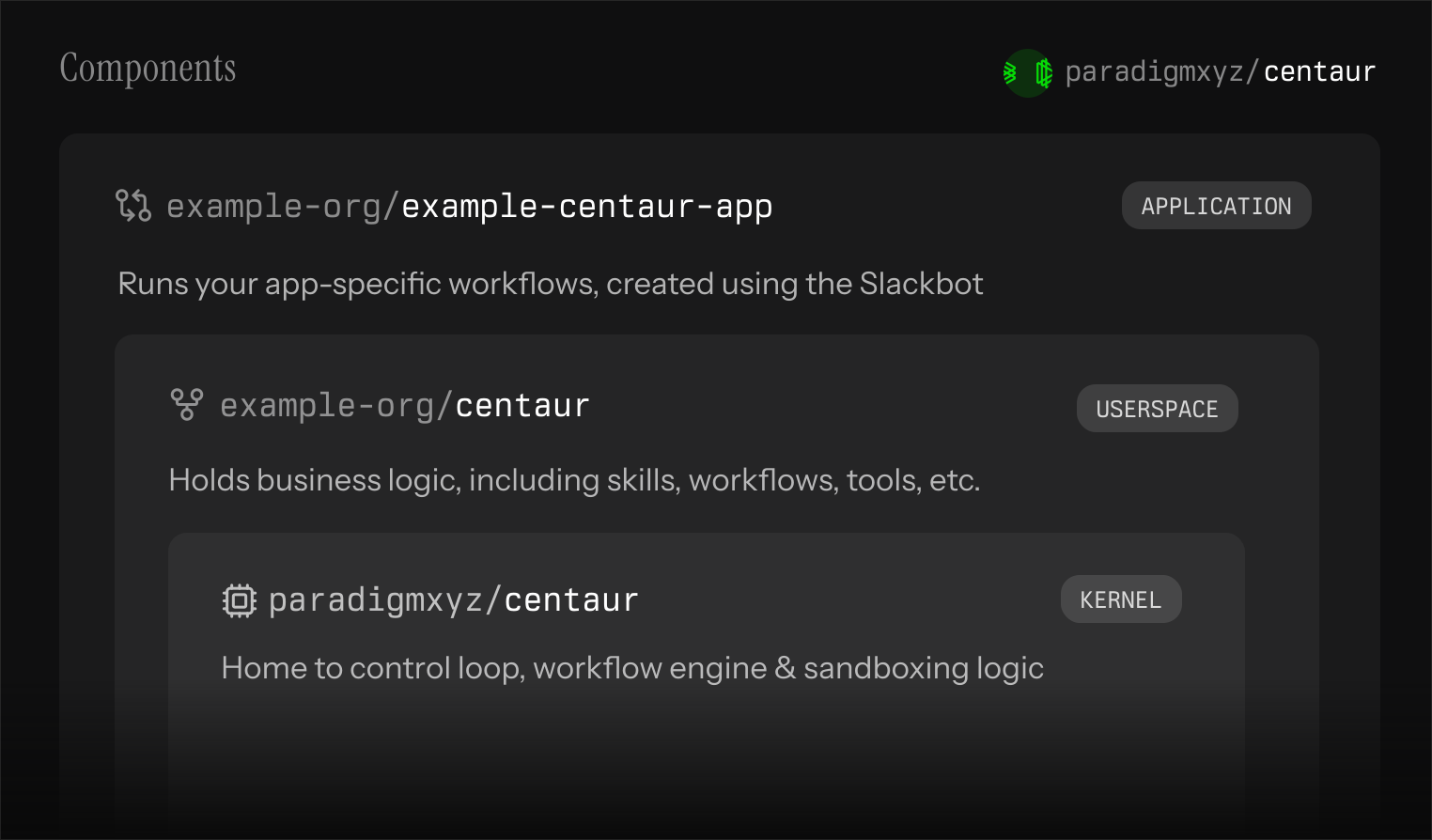
Centaur deployment layout: the open-source kernel wrapped by an organization overlay and a per-app repository.

Modular Architecture

Durable control plane, isolated execution, and credential-safe egress. Each layer is independently observable, replaceable, and self-hosted inside your boundary.

View the architecture →
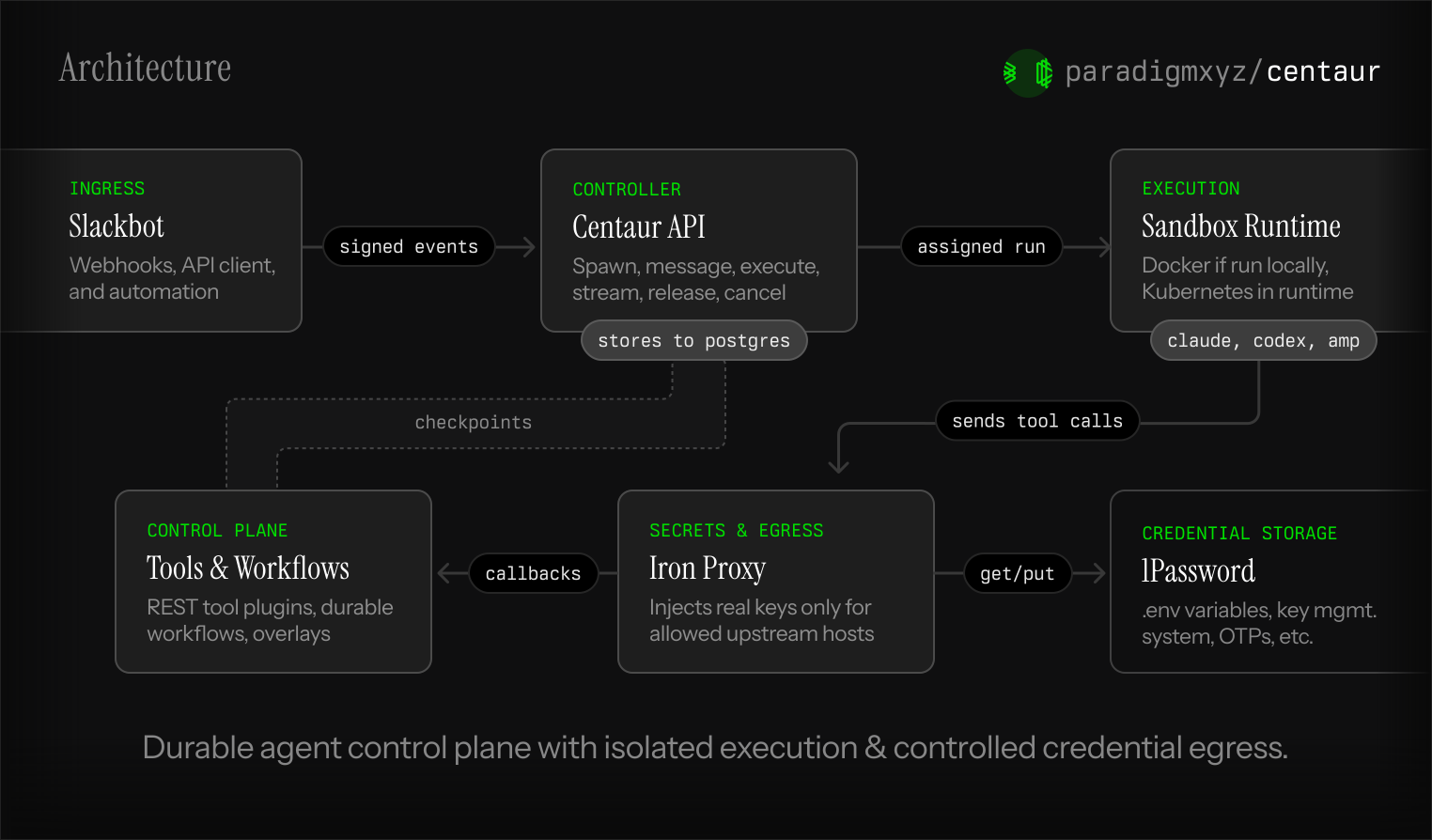

Centaur architecture: ingress, durable control plane, isolated execution, capabilities, secrets, and controlled egress.
# Architecture Centaur accepts Slack and API requests, stores each turn, assigns an isolated runtime, exposes approved tools, injects credentials through a proxy, and keeps an event trail clients can replay.
Centaur architecture — ingress, durable control plane, isolated execution, tools, workflows, and controlled egress
## Planes | Plane | Responsibility | Main components | |-------|----------------|-----------------| | Ingress | Accept user and client input. | Slack Events API, Slackbot webhook, external API clients. | | Control | Persist requests and coordinate runtime state. | FastAPI, Postgres, execution worker. | | Execution | Run one assigned agent session per thread. | Kubernetes sandbox pods. | | Capabilities | Give agents approved actions. | Tool plugins, workflow engine, overlays. | | Secrets and egress | Let agents call third-party APIs without receiving raw keys. | Kubernetes Secret, [iron-proxy](https://docs.iron.sh), per-sandbox proxy token mapping. | ## Durable API lifecycle Clients do not manage containers or keep long-running processes alive. They call the API and follow the event stream. | Step | Endpoint | What it saves | |------|----------|----------------| | Start or reuse a sandbox | `POST /agent/spawn` | The thread's current sandbox assignment. | | Persist input | `POST /agent/message` | Writes the user turn and extracts large multimodal attachments. | | Run the agent | `POST /agent/execute` | A run row with status and final result. | | Follow output | `GET /agent/threads/{thread}/events` | Tool calls, model output, status changes, and final text. | | Clean up | `POST /agent/threads/{thread}/release` | Releases the sandbox and can cancel running work. | Because each step is stored, a Slack reconnect, browser refresh, API restart, pod replacement, or worker failover does not erase the run. The event stream is the client contract; Slack and other clients should reconnect with `after_event_id` instead of trying to reconstruct state locally. ## Slackbot ingress Slack talks to Centaur through the Slack Events API. The public request URL is the Slackbot webhook, usually: ```text https://api.acme.com/api/webhooks/slack ``` The webhook does not use a Centaur API key. Slack signs every request with `X-Slack-Signature` and `X-Slack-Request-Timestamp`; the Slackbot validates that HMAC signature with `SLACK_SIGNING_SECRET` before it routes the event to the API. After validation, the Slackbot calls Centaur's agent API with `SLACKBOT_API_KEY`. During a Slack delivery, the API owns the execution state while Slackbot owns Slack rendering: opening or updating the thread UI, streaming chunks, rendering steps, and posting the final answer. The landing page preview shows that Slack thread surface; the durable API lifecycle above is the system underneath it. ## Execution path Kubernetes is the active sandbox runtime path. The API creates or claims a sandbox pod, attaches to it, and runs the requested agent CLI. Do not plan a new deployment around a local-container backend; the Helm chart, warm pool, overlay mounting, and network policies all assume Kubernetes sandboxes. | Harness | Adapter behavior | |---------|------------------| | Amp | Materializes image/document blocks to files and passes text plus file references. | | Claude Code | Passes the Anthropic-shaped content through directly. | | Codex / pi-mono | Extracts text blocks for CLIs that accept a plain prompt. | The pod receives the prompt files, CLI command, internal API URL, proxy CA, and proxy settings. It does not need Kubernetes credentials or long-lived third-party API keys. ## Tool and workflow layer Tools are Python plugin directories. Each public client method becomes a REST method at `/tools/{name}/{method}`. Agents discover tools when they start. Use tools for search, Slack, GitHub, market data, calendars, internal systems, and deployment-specific APIs. Tool code should read credentials with `secret("NAME")` so the same code works locally and in production. Workflows are Python handlers that save step results. When a worker restarts, the handler runs again, but `ctx.step(...)` returns cached results for completed work. Use workflows for scheduled digests, monitoring loops, approval gates, jobs that sleep for minutes or days, and parent/child workflow trees. ## Secrets and outbound requests Agents and tools refer to credentials by name, such as `OPENAI_API_KEY` or `secret("CRM_API_TOKEN")`. The sandbox container only ever holds those placeholder names; the real values live on a per-sandbox [iron-proxy](https://docs.iron.sh) pod, bound to specific upstream hosts and request locations, and substituted on the wire when an outbound request matches. See [Security](/security) for the full threat model and what it does and does not protect against. ## Failure model | Failure | Expected recovery | |---------|-------------------| | Client disconnects | Reconnect to the event stream with `after_event_id`. | | API restarts | Reload assignments, executions, and terminal state from Postgres. | | Sandbox pod dies | The execution becomes terminal, the event trail remains in Postgres, and operators inspect `GET /agent/executions/{execution_id}` plus API/sandbox logs before retrying the turn. | | Workflow worker restarts | Re-run the handler and skip completed checkpoints. | | Proxy restarts | Rebuild the key-injection map from the secret-manager cache. | | Tool changes | Discovery reloads plugin metadata; agents see the updated methods. | # Brand Centaur ships a lockup (mark + wordmark) and a standalone mark. Each asset has a black-ink variant for light backgrounds and a white variant for dark. Pick the one whose ink contrasts the surface. ## Lockup Use the lockup wherever the brand needs to be named — README banners, page headers, social cards.
Centaur lockup, black ink
Lockup — black On light backgrounds
SVG PNG
Centaur lockup, white ink
Lockup — white On dark backgrounds
SVG PNG
## Mark Use the standalone mark where space is tight — app icons, favicons, social avatars, chat bot identities.
Centaur mark, black
Mark — black On light backgrounds
SVG PNG
Centaur mark, white
Mark — white On dark backgrounds
SVG PNG
## Usage | Do | Don't | |----|-------| | Give the lockup at least one mark-height of clear space on all sides. | Pack copy or other graphics tight against the mark. | | Pick the ink (black or white) whose contrast carries on its background. | Recolor, tint, or apply a stroke. | | Scale the lockup proportionally. | Stretch, skew, rotate, or composite with other shapes. | | Use the mark for square contexts (favicons, app icons, avatars). | Crop the lockup to substitute for the mark. | ## Everything in one zip Grab every asset in PNG + SVG at once: [Download centaur-brand-assets.zip](/centaur-brand-assets.zip). Right-click the Centaur logo anywhere in this site for the same shortcut.
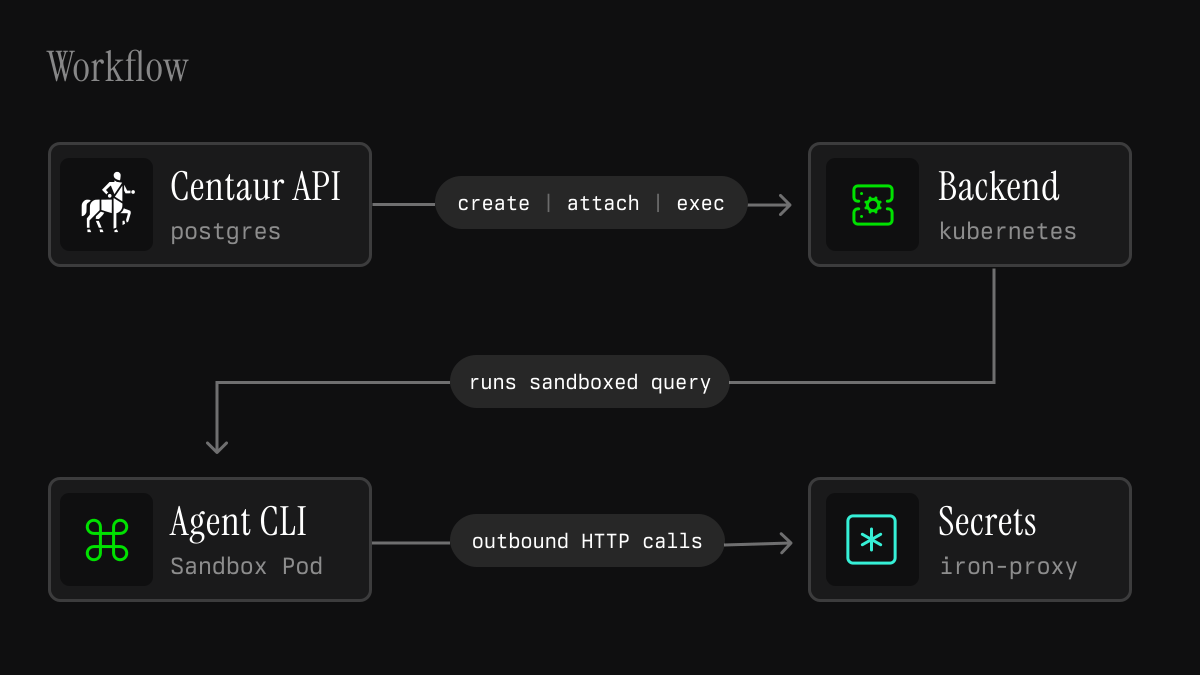
# Deploying in Production Production Centaur is a Kubernetes deployment with durable API state in Postgres, sandbox pods for agent execution, and [iron-proxy](https://docs.iron.sh) for credential injection. The goal is a small working deployment with a clear operator before you add more tools, workflows, harnesses, or overlays. ## Production shape The API saves threads, runs, and events in Postgres. The Kubernetes backend creates sandbox pods for agent work. [iron-proxy](https://docs.iron.sh) handles outbound requests that need credentials:
Centaur production workflow — Centaur API plus Postgres hands a run to the Kubernetes backend, which attaches a sandbox pod whose outbound HTTP routes through iron-proxy
Slackbot and API ingress → Centaur API (Postgres-backed) → Kubernetes sandbox runtime → outbound traffic through iron-proxy.
Each pod receives the prompt files, environment, proxy CA, proxy settings, and command it needs for one assigned thread. It should not receive raw model keys or third-party API keys. ## 1. Choose the operating boundary Before installing, decide: | Question | Why it matters | |----------|----------------| | Who is the operator? | Someone must own secrets, upgrades, incidents, and access reviews. | | What Slack workspace and channels matter? | Defines the first user and permission boundary. | | What repos should agents work on? | Determines GitHub token scope and repo cache needs. | | What tools or data sources matter first? | Keeps setup focused on one useful loop. | | What is sensitive? | Determines private channels, tool scopes, and review requirements. | Good first deployments have one narrow engineering, research, support, security, data, or operations workflow where agents can call real tools. ## 2. Create the infra secret The Helm chart reads infrastructure values from an existing Kubernetes Secret. By default that Secret is named `centaur-infra-env`: ```yaml secretManager: existingSecretName: centaur-infra-env envPrefix: "" ``` For local development, `just bootstrap-secrets` creates this Secret from your shell environment. In production, create it through your normal secret delivery path before installing the chart. Minimum keys: | Secret | Required for | Notes | |--------|--------------|-------| | `DATABASE_URL` | API | Postgres connection string. | | `IRON_MANAGEMENT_API_KEY` | [iron-proxy](https://docs.iron.sh) management API | Generate with `openssl rand -hex 32`. | | `SANDBOX_SIGNING_KEY` | Sandbox API tokens | Generate with `openssl rand -hex 32`; keeps sandbox tokens valid across API restarts. | | `SLACK_BOT_TOKEN` | Slackbot | Bot User OAuth Token from the Slack app. | | `SLACK_SIGNING_SECRET` | Slackbot/API | Used to verify Slack webhook signatures. | | `SLACKBOT_API_KEY` | Slackbot to API | Static service token; API bootstraps it into Postgres on startup with `agent` scope. | | `OP_CONNECT_TOKEN` | [iron-proxy](https://docs.iron.sh) 1Password Connect source (preferred) | Needed when `ironProxy.secretSource` is `onepassword-connect`. | | `OP_SERVICE_ACCOUNT_TOKEN` | [iron-proxy](https://docs.iron.sh) 1Password service-account source | Needed when `ironProxy.secretSource` is `onepassword`. | | `OP_VAULT` | [iron-proxy](https://docs.iron.sh) 1Password source | Vault name or id used for `op://` references (either mode). | `SLACKBOT_API_KEY` is not created with the admin API during initial boot, because the API process requires it before it can start. Generate a high-entropy value, store it in the infra Secret, and reuse the same value in Slackbot. ## 3. Configure harness credentials Store one secret per enabled harness credential: | Harness | API value | Slack selector | Credential to store | Upstream | |---------|-----------|----------------|---------------------|----------| | Codex default | `codex` | none or `--codex` | `OPENAI_API_KEY` | `api.openai.com` | | Codex with OpenRouter provider | `codex` | none or `--codex` | `OPENROUTER_API_KEY` | `openrouter.ai` | | Amp | `amp` | `--amp` | `AMP_API_KEY` | `ampcode.com` | | Claude Code | `claude-code` | `--claude` | `ANTHROPIC_API_KEY` | `api.anthropic.com` | | pi-mono | `pi-mono` | `--pi` | `ANTHROPIC_API_KEY` | `api.anthropic.com` | In normal sandbox mode, containers receive placeholder values such as `OPENAI_API_KEY=OPENAI_API_KEY`. [iron-proxy](https://docs.iron.sh) swaps the placeholder for the real key on outbound requests, only on the hosts and headers the secret is bound to. When `ironProxy.secretSource` is `onepassword`, [iron-proxy](https://docs.iron.sh) resolves these values from `op://$OP_VAULT//credential`. For example, store the default Codex credential in a 1Password item named `OPENAI_API_KEY`. To run Codex through OpenRouter, store `OPENROUTER_API_KEY` and set `OPENROUTER_MODEL` to a model slug such as `openrouter/auto`, or set `CODEX_MODEL_PROVIDER=openrouter` alongside `CODEX_MODEL`. Per-turn Codex model overrides with provider-style slugs such as `--model anthropic/claude-fable-5` also select the OpenRouter provider even when `OPENROUTER_MODEL` is unset. Whatever source you pick, the vault is shared across the whole deployment, so any thread can use any configured credential. Per-user and per-channel scoping is on the roadmap; until then, scope tool and harness access accordingly. See [Security](/security) for the full threat model. ### Codex Auth Modes :::warning\[Dedicate the account to Centaur] Do not use this ChatGPT account for `codex` outside Centaur once its refresh token is in the broker. OpenAI's OAuth flow uses strict refresh token reuse detection: if you keep running `codex` locally with the same account, both clients will race to rotate the refresh token. Whichever side rotates second is treated as a stolen credential and the entire token family is revoked, logging both sides out at random. Use a separate ChatGPT account for any non-Centaur Codex work. ::: Codex supports two authentication modes, selected per deployment with the `CODEX_AUTH_MODE` env var on the sandbox (set it via `sandbox.extraEnv`): | Mode | Upstream | Secrets required | |------|----------|------------------| | `api_key` (default) | `api.openai.com` | `OPENAI_API_KEY` | | `access_token` | `chatgpt.com` | `OPENAI_CODEX_CLIENT_ID`, `OPENAI_CODEX_BLOB`, `OPENAI_CODEX_ACCOUNT_ID` | `access_token` mode routes Codex through a ChatGPT account rather than a raw API key. [iron-token-broker](https://docs.iron.sh) holds the refresh token and mints short-lived access tokens, which iron-proxy injects on outbound requests so the sandbox never sees them. Store these three items in your secrets backend (1Password vault, Kubernetes Secret, etc.) when running in `access_token` mode: * `OPENAI_CODEX_CLIENT_ID`: the Codex CLI's OAuth client id. This is a fixed, publicly known constant: `app_EMoamEEZ73f0CkXaXp7hrann`. It is the same for every Codex install and never rotates, but the broker still resolves it through your secrets backend, so store the literal value as-is. * `OPENAI_CODEX_BLOB`: a JSON document `{"refresh_token": "..."}`. The broker rotates this in place on every refresh, so the backing item must be writable. * `OPENAI_CODEX_ACCOUNT_ID`: the ChatGPT account UUID the credential is bound to. It is static, but iron-proxy injects it as the `chatgpt-account-id` header so the backend can route to the right workspace. Store it alongside the other two, not in code. To bootstrap, run `codex login` locally, then copy the refresh token and account id from `~/.codex/auth.json` into the matching secret items. Use the constant above for `OPENAI_CODEX_CLIENT_ID`. ### Claude Auth Modes :::warning\[Dedicate the account to Centaur] Do not use this Claude.ai account for `claude` outside Centaur once its refresh token is in the broker. Anthropic's OAuth flow uses strict refresh token reuse detection: if you keep running `claude` locally with the same account, both clients will race to rotate the refresh token. Whichever side rotates second is treated as a stolen credential and the entire token family is revoked, logging both sides out at random. Use a separate Claude.ai account for any non-Centaur Claude Code work. ::: Claude Code supports two authentication modes, selected per deployment with the `CLAUDE_CODE_AUTH_MODE` env var on the sandbox (set it via `sandbox.extraEnv`): | Mode | Upstream | Secrets required | |------|----------|------------------| | `api_key` (default) | `api.anthropic.com` | `ANTHROPIC_API_KEY` | | `access_token` | `api.anthropic.com` | `CLAUDE_CODE_CLIENT_ID`, `CLAUDE_CODE_BLOB` | `access_token` mode routes Claude Code through a Claude.ai Pro or Max subscription rather than a raw API key. [iron-token-broker](https://docs.iron.sh) holds the refresh token and mints short-lived access tokens, which iron-proxy injects on outbound requests so the sandbox never sees them. The entrypoint plants a dummy `~/.claude/.credentials.json` so the CLI emits OAuth-shaped requests; the broker overwrites the Bearer at request time. Store these two items in your secrets backend (1Password vault, Kubernetes Secret, etc.) when running in `access_token` mode: * `CLAUDE_CODE_CLIENT_ID`: the Claude Code CLI's OAuth client id. This is a fixed, publicly known constant: `9d1c250a-e61b-44d9-88ed-5944d1962f5e`. It is the same for every Claude Code install and never rotates, but the broker still resolves it through your secrets backend, so store the literal value as-is. * `CLAUDE_CODE_BLOB`: a JSON document `{"refresh_token": "..."}`. The broker rotates this in place on every refresh, so the backing item must be writable. To bootstrap, run `claude login` locally, then copy the refresh token from `~/.claude/.credentials.json` (or from the `Claude Code-credentials` keychain item on macOS) into `CLAUDE_CODE_BLOB`. Use the constant above for `CLAUDE_CODE_CLIENT_ID`. ## 4. Configure Slack Create the Slackbot app at [api.slack.com/apps](https://api.slack.com/apps). Use the app page to install the bot, copy the Bot User OAuth Token for `SLACK_BOT_TOKEN`, and copy the Signing Secret for `SLACK_SIGNING_SECRET`. 1. Add the bot scopes required by the Slackbot features you enable. 2. Install the app to the workspace. 3. Store the Bot User OAuth Token as `SLACK_BOT_TOKEN`. 4. Store the app Signing Secret as `SLACK_SIGNING_SECRET`. 5. Enable Event Subscriptions. 6. Set the Request URL to `https:///api/webhooks/slack`. 7. Subscribe to `app_mention` and to the message events you want Centaur to see: `message.channels`, `message.groups`, and `message.im`. The Slackbot currently normalizes Slack `app_mention` and `message` events. Do not rely on assistant-specific Slack event types unless the Slackbot code has explicit support for them. Do not put Centaur API-key auth in front of `/api/webhooks/slack`; the Slackbot validates Slack's signature and then calls the Centaur API separately. The Slackbot accepts Slack events at `/api/webhooks/slack`. It also registers compatibility paths for `/api/slack/events`, `/api/slack/actions`, `/api/slack/options`, and `/api/slack/commands`. ## 5. Deploy with Helm The chart lives at `contrib/chart`. Select service images, [iron-proxy](https://docs.iron.sh) secret source, sandbox image, and optional runtime class in your values file: ```yaml secretManager: existingSecretName: centaur-infra-env envPrefix: "" api: executionWorkerEnabled: true warmPoolEnabled: true ironProxy: secretSource: onepassword-connect secretTtl: 10m onepasswordConnect: connect: create: true credentialsName: centaur-onepassword-connect-credentials credentialsKey: 1password-credentials.json sandbox: image: repository: centaur-agent tag: latest pullPolicy: IfNotPresent runtimeClassName: gvisor ``` The Kubernetes sandbox backend is the active runtime backend; there is no chart switch named `api.sandboxBackend`. Install or upgrade: ```bash helm lint contrib/chart helm upgrade --install centaur contrib/chart \ --namespace centaur-system \ --create-namespace \ -f values.production.yaml ``` ## 6. Verify the deployment Check health from inside the API deployment first. Localhost is accepted for operator-only routes, so this avoids needing an external admin key for the first smoke check: ```bash kubectl exec -n centaur-system deploy/centaur-centaur-api -- \ curl -fsS http://localhost:8000/health kubectl exec -n centaur-system deploy/centaur-centaur-api -- \ curl -fsS http://localhost:8000/health/ready | jq kubectl exec -n centaur-system deploy/centaur-centaur-api -- \ curl -fsS http://localhost:8000/health/tools | jq ``` If you need to call operator routes from outside the cluster, create an admin API key from inside the API deployment and save the returned plaintext key: ```bash kubectl exec -n centaur-system deploy/centaur-centaur-api -- \ curl -fsS -X POST http://localhost:8000/admin/api-keys \ -H "Content-Type: application/json" \ -d '{"name":"operator","scopes":["admin"],"created_by":"ops"}' | jq ``` External operator calls then use: ```bash curl -s "$CENTAUR_API_URL/health/tools" \ -H "X-Api-Key: $ADMIN_KEY" | jq ``` Run one agent turn from inside the API deployment: ```bash THREAD_KEY=production-smoke-codex SPAWN=$(kubectl exec -n centaur-system deploy/centaur-centaur-api -- curl -s -X POST http://localhost:8000/agent/spawn \ -H "Content-Type: application/json" \ -d "{\"thread_key\":\"${THREAD_KEY}\"}") ASSIGNMENT_GENERATION=$(printf '%s' "$SPAWN" | jq -r '.assignment_generation') kubectl exec -n centaur-system deploy/centaur-centaur-api -- curl -s -X POST http://localhost:8000/agent/message \ -H "Content-Type: application/json" \ -d "{\"thread_key\":\"${THREAD_KEY}\",\"assignment_generation\":${ASSIGNMENT_GENERATION},\"role\":\"user\",\"parts\":[{\"type\":\"text\",\"text\":\"Reply with exactly PONG.\"}]}" EXECUTE=$(kubectl exec -n centaur-system deploy/centaur-centaur-api -- curl -s -X POST http://localhost:8000/agent/execute \ -H "Content-Type: application/json" \ -d "{\"thread_key\":\"${THREAD_KEY}\",\"assignment_generation\":${ASSIGNMENT_GENERATION},\"delivery\":{\"platform\":\"dev\"}}") EXECUTION_ID=$(printf '%s' "$EXECUTE" | jq -r '.execution_id') kubectl exec -n centaur-system deploy/centaur-centaur-api -- curl -s \ "http://localhost:8000/agent/executions/${EXECUTION_ID}" | jq ``` Then run the same prompt through Slack: ```text reply with exactly PONG ``` Slack messages without a harness flag use Codex. Use `--amp`, `--claude`, `--codex`, or `--pi` only when you want to select a specific harness. Inspect sandbox pods with the labels Centaur actually sets: ```bash kubectl get pods -n centaur-system -l centaur.ai/managed=true ``` If a run fails because the sandbox pod exits or is deleted, inspect the durable execution before retrying: ```bash kubectl exec -n centaur-system deploy/centaur-centaur-api -- curl -s \ "http://localhost:8000/agent/executions/${EXECUTION_ID}" | jq kubectl logs -n centaur-system deploy/centaur-centaur-api --tail=200 kubectl get pods -n centaur-system -l centaur.ai/managed=true ``` Centaur preserves the execution row and event trail; retry by starting a new turn after you understand whether the failure was credentials, image pull, network policy, harness startup, or the upstream model/tool call. ## 7. Keep the operating loop small Before expanding the deployment, record: 1. The operator. 2. Where secrets live. 3. How to restart the stack. 4. The first working Slack channel. 5. The enabled harnesses. 6. The first useful tool or workflow. 7. How to inspect logs and failed runs. The operator's job is to leave behind a repeatable operating loop, not a one-time demo. # Running Centaur on a Mac Mini-style setup The easiest way to run Centaur outside a developer laptop is a small always-on machine with k3s. This can be a Mac Mini running Linux, a DigitalOcean droplet, another simple VPS, or a spare Linux box. You do not need a managed Kubernetes cluster to get started. Centaur publishes development images to GHCR. On a single small host, the simplest setup is to point the local chart at those images instead of building and importing images into k3s' container runtime. If you are evaluating on macOS, especially Apple Silicon, use the local-build path below. Native k3s is Linux-only, and published images are currently x86 only. In that case, build the images locally and load them into the local cluster runtime. ## macOS local evaluation with kind This is the quickest reproducible laptop path when GHCR images do not match your Mac's architecture. ```bash brew install just kubectl helm jq kind cloudflared kind create cluster --name centaur kubectl config use-context kind-centaur ``` Export the same bootstrap secrets as the Linux path below, then build and load local images: ```bash just build kind load docker-image \ centaur-api-rs:latest \ centaur-slackbotv2:latest \ centaur-iron-proxy:latest \ centaur-agent:latest \ --name centaur ``` Kind nodes have their own containerd image store, so local `docker build` images are not visible to Kubernetes until you run `kind load docker-image`. The same separate-image-store rule applies to k3s; use `just up k3s` there to import images into k3s containerd. ## 1. Install k3s Run these commands on the machine that will host Centaur: ```bash curl -sfL https://get.k3s.io | sh - sudo chmod 644 /etc/rancher/k3s/k3s.yaml export KUBECONFIG=/etc/rancher/k3s/k3s.yaml kubectl get nodes ``` Persist `KUBECONFIG` in your shell profile if you want future shells to target this cluster automatically. ## 2. Install local tools Install Docker plus the command-line tools Centaur's local workflow expects: ```bash brew install just kubectl helm jq ``` If `brew` is not available on your Linux host, install Docker, `just`, `kubectl`, `helm`, and `jq` from your package manager or their upstream installers. Clone Centaur on the host: ```bash git clone cd centaur ``` ## 3. Use GHCR images Use `source=ghcr` with the local Just recipes to point the chart at the published `ghcr.io/paradigmxyz/centaur-*` images instead of local image names. This keeps the chart's default `latest` tags and `IfNotPresent` pull policy from `contrib/chart/values.dev.yaml`. If GHCR access for the repository is private, create an image pull Secret and add it to the chart with `global.imagePullSecrets`. ## 4. Bootstrap secrets The default local chart expects one infra Secret named `centaur-infra-env`. Export the required values before deploying: ```bash export OP_SERVICE_ACCOUNT_TOKEN=... export OP_VAULT=... export SLACK_BOT_TOKEN=... export SLACK_SIGNING_SECRET=... export SLACKBOT_API_KEY=... ``` Then create the Kubernetes Secret: ```bash just bootstrap-secrets ``` ## 5. Deploy Centaur Deploy the Helm chart with the GHCR image values: ```bash just source=ghcr deploy just status ``` Verify the API: ```bash kubectl exec -n centaur deploy/centaur-centaur-api-rs -- \ curl -fsS http://localhost:8080/healthz ``` Expected shape: ```json {"status":"ok"} ``` Then continue with the [Quickstart](/quickstart) smoke test and agent-turn verification steps. ## 6. Optional: expose local Slackbot with a tunnel If you are running Centaur only on your laptop, Slack cannot reach the in-cluster Slackbot service directly. Use any HTTPS tunnel that can forward to localhost, such as Cloudflare Tunnel, ngrok, zrok, or Tailscale Funnel. For example, with Cloudflare Tunnel, forward Slackbot to localhost and expose it with a temporary HTTPS URL: ```bash kubectl port-forward -n centaur svc/centaur-centaur-slackbotv2 3001:3001 ``` In another terminal: ```bash cloudflared tunnel --url http://localhost:3001 ``` Use the generated `https://*.trycloudflare.com` URL as the host in the [Quickstart Slack webhook setup](/quickstart#61-set-up-the-slack-app): ```text https:///api/webhooks/slack ``` Temporary tunnel URLs usually change when the tunnel restarts, so update the Slack Request URL each time or configure a named tunnel/domain. For a durable, in-cluster alternative that keeps a stable public URL, see [Expose the Slackbot with Tailscale Funnel](/operate/tailscale-funnel). # Quickstart This guide gets you from a fresh checkout to a working local Centaur stack. You do not need a full production Kubernetes installation for local setup: a lightweight k3s-based cluster is enough. The happy path is: point `kubectl` at that cluster, bootstrap the required infra Secret, run `just up`, verify the API, then run one agent turn without Slack. If you want the easiest small-host path first, start with [Running Centaur on a Mac Mini-style setup](/mac-mini-setup). If you want an agent to drive setup with you, point it at these docs: every page is available through `/llms.txt`, `/llms-full.txt`, and static Markdown files such as `/md/quickstart.md`. ## 1. Install prerequisites From the repo root: ```bash brew install just kubectl helm jq ``` You also need Docker and a local Kubernetes cluster. This can be lightweight: k3s works on a small VPS, DigitalOcean droplet, Linux box, or Mac Mini-style host. Docker Desktop with Kubernetes enabled, kind, and minikube are also fine as long as `kubectl` points at that local cluster and it can run the Helm chart. The [Mac Mini-style setup guide](/mac-mini-setup) walks through the k3s path and includes notes for macOS/kind local evaluation. Check the target before booting Centaur: ```bash kubectl config current-context kubectl get nodes ``` The `Justfile` builds local images named `centaur-api-rs:latest`, `centaur-iron-proxy:latest`, `centaur-slackbotv2:latest`, and `centaur-agent:latest`, then deploys `contrib/chart` with `contrib/chart/values.dev.yaml`. ## 2. Export bootstrap secrets The default local chart expects one infra Secret named `centaur-infra-env`. `just bootstrap-secrets` creates it from your shell environment. `just bootstrap-secrets` currently requires these shell variables: ```bash export OP_SERVICE_ACCOUNT_TOKEN=... export OP_VAULT=... export SLACK_BOT_TOKEN=... export SLACK_SIGNING_SECRET=... export SLACKBOT_API_KEY=... ``` Create the Slackbot app at [api.slack.com/apps](https://api.slack.com/apps). Use the app's Bot User OAuth Token for `SLACK_BOT_TOKEN` and its Signing Secret for `SLACK_SIGNING_SECRET`. `OP_SERVICE_ACCOUNT_TOKEN` and `OP_VAULT` let [iron-proxy](https://docs.iron.sh) resolve model and tool credentials through 1Password. `SLACK_SIGNING_SECRET` and `SLACKBOT_API_KEY` are API boot requirements in the current chart. `SLACK_BOT_TOKEN` is required by the default local bootstrap because Slackbot is enabled in `values.dev.yaml`; use a real token if you want to test Slack. `SLACKBOT_API_KEY` is a static service token. The API bootstraps that value into Postgres on startup, so it must exist before `just up`. Application-level model and tool secrets, such as `OPENAI_API_KEY`, `ANTHROPIC_API_KEY`, `AMP_API_KEY`, and `GITHUB_TOKEN`, should live in 1Password or the configured [iron-proxy](https://docs.iron.sh) secret source. Sandboxes receive placeholder values and [iron-proxy](https://docs.iron.sh) injects the real credentials only on approved outbound requests. The default harness is `codex`, so `OPENAI_API_KEY` must exist in the configured secret source before Slack agent turns can complete. Use explicit harness selectors only when you want a non-default harness such as Amp or Claude Code. ## 3. Boot the stack ```bash just up ``` That runs: 1. `just bootstrap-secrets` 2. `just build` 3. `just deploy` Check the namespace: ```bash just status ``` ## 4. Verify the API The API exposes localhost inside its own deployment. Localhost bypasses external API-key auth, which is why the health check runs through `kubectl exec`: ```bash kubectl exec -n centaur deploy/centaur-centaur-api-rs -- \ curl -fsS http://localhost:8080/healthz ``` Expected shape: ```json {"status":"ok"} ``` ## 5. Run an agent turn Before testing Slack, run the local smoke test. It uses the same durable agent API that Slackbot uses: spawn or reuse a runtime, persist a message, enqueue an execution, and poll the execution state until the result contains `PONG`. ```bash just smoke ``` The successful result includes the terminal execution row. The important fields are: ```json { "status": "completed", "result_text": "...PONG..." } ``` If the smoke test times out or fails, start with the local stack state: ```bash just status just logs api kubectl get pods -n centaur -l centaur.ai/managed=true ``` If you changed the namespace or release name, set `CENTAUR_NAMESPACE` and `CENTAUR_RELEASE` before running `just smoke` so the recipe targets the right deployment. ## 6. Setup Slack integration Slack needs to reach the Slackbot webhook at a public HTTPS URL. Configure your network, ingress, or local tunnel so the Slackbot route is reachable at: ```text https:///api/webhooks/slack ``` In your Slack app's **Event Subscriptions** settings, set the Request URL to the Slackbot webhook URL above. Subscribe to the `app_mention` bot event. For a minimal channel-mention test, the app also needs Bot Token Scopes that let it read mentions and write replies, for example `app_mentions:read` and `chat:write`. If you enable DM events such as `message.im`, Slack will also require direct-message scopes such as `im:history`. Save changes and reinstall the app. ## 7. Try Slack mentions Invite the bot to a test channel and mention it: ```text /invite @ @ reply with exactly PONG ``` Slack messages without a harness flag use Codex. Add a selector such as `--amp`, `--claude`, or `--pi` only when you want to override the default. If Slack receives the mention but no agent runs, inspect Slackbot logs: ```bash just logs slackbot ``` You should see `POST /api/webhooks/slack`. # How is Centaur securing my secrets? Centaur runs untrusted code on behalf of users: agent harnesses execute model-generated commands, tools fetch and act on external data, and prompts can be influenced by anyone whose content reaches the thread. This page describes what Centaur defends against and the mechanisms that do the defending. ## Threat model The realistic threats are: * **Prompt injection and adversarial inputs.** A malicious instruction in a Slack message, a tool response, a webpage the agent fetched, or a file in the sandbox can cause the agent to take unintended actions: exfiltrate data, call a sensitive tool, or attempt to reach an attacker-controlled host. * **Compromised or malicious dependencies.** Tool code, agent harness binaries, or libraries pulled into the sandbox could try to phone home, mine credentials, or open a reverse shell. * **Credential abuse.** Anything that does run in the sandbox has the potential to try to extract, log, or misuse the credentials a tool needs to do its job. Centaur is not trying to defend against a fully privileged attacker already on the host or in the cluster control plane. The model is defense in depth for what runs inside the sandbox. ## Mitigations ### Sandbox isolation Each thread runs in its own Kubernetes pod, created and torn down by the API. Pods are short-lived and run a restricted container security context (no privilege escalation, all capabilities dropped). Code that runs in the sandbox cannot reach other sandboxes' filesystems, processes, or networking. ### Network policy The Helm chart applies a default-deny NetworkPolicy to every pod in the namespace. Sandbox pods can only communicate with the Centaur API and their own dedicated per-sandbox iron-proxy pod. Nothing else in the cluster or on the internet is directly reachable. Because iron-proxy is per-sandbox rather than shared, a compromise of one sandbox's proxy cannot leak into another sandbox. ### Egress policy All outbound traffic from the sandbox routes through iron-proxy, so egress policy is enforced in one place. By default the policy is open. To lock egress down, edit [`iron-proxy.yaml`](https://github.com/paradigmxyz/centaur/blob/main/services/iron-proxy/iron-proxy.yaml) and replace: ```yaml transforms: - name: allowlist config: domains: - "*" ``` with the explicit list of hostnames (or globs like `*.anthropic.com`) your tools actually need. iron-proxy will reject everything else with a 403. See the [iron-proxy configuration reference](https://docs.iron.sh/reference/configuration/) for the full set of allowlist options. ### Credentials Tool and harness credentials never reach the sandbox. Tools declare their secrets in `pyproject.toml`: ```toml [tool.centaur] secrets = [ {type = "http", name = "WAREHOUSE_API_KEY", match_headers = ["Authorization"], hosts = ["warehouse.internal.example.com"]}, ] ``` Three properties of this declaration matter: * **Placeholders, not values.** The sandbox sees the literal string `WAREHOUSE_API_KEY`. iron-proxy substitutes the real credential on outbound requests; the value is never present in the sandbox's environment, files, prompts, or logs. * **Bound to specific hosts.** The substitution only happens for the hosts listed in `hosts`. A leaked placeholder cannot be redirected to an attacker-controlled host. * **Bound to specific locations.** `match_headers`, `match_query`, or `match_path` constrain where the placeholder is allowed to appear. The placeholder cannot be smuggled out in a different field or header. Other typed variants extend the same boundary in different ways: * **`oauth_token`** resolves the declared OAuth credential fields from the secret source, exchanges them for an access token, caches and refreshes that token, then injects it as `Authorization: Bearer ...` for matching hosts. The sandbox never sees the client secret, refresh token, or minted access token. * **`gcp_auth`** resolves a Google service-account keyfile, mints Google OAuth tokens for the configured scopes, and injects those bearer tokens for the configured Google API hosts. * **`pg_dsn`** resolves the real upstream Postgres DSN inside iron-proxy. The sandbox receives a local DSN that points at its per-sandbox proxy listener, so tool code can connect normally without receiving the real database URL. See [Creating Tools](/extend/tools) for the full schema. ### Audit trail Every agent turn (user input, sandbox assignment, execution, streamed events, tool calls, final delivery) is persisted in Postgres. iron-proxy emits structured logs for every outbound request, including which secret was substituted and which transforms ran. Together they make it possible to reconstruct what an agent did and what credentials it reached for. ## What this does not protect against A few honest caveats: * **Credentials are deployment-scoped, not yet user-scoped.** Tool and harness secrets live in a single vault (a Kubernetes Secret or a 1Password vault) that every sandbox in the deployment draws from, so a tool's reach is the same regardless of which user invokes it. Per-user and per-channel scoping is on the roadmap. A thread in `#payments` would get the payments `GITHUB_TOKEN` rather than a deployment-wide one, and a DM would resolve to the invoking user's credentials. See the [Advanced Permissioning roadmap](/secrets/advanced-permissioning). Until that lands, pick which tools and harnesses an installation exposes with the current scope in mind. * **The default egress allowlist is permissive.** Leaving it open is a deliberate UX choice. An open configuration lets users start using agents immediately and develop an allowlist over time. If you want maximal security, lock down the allowlist up front. * **Agents have broad permissions inside the sandbox.** They can read and write the sandbox filesystem, run shell commands, and call any Centaur tool their API token allows. The containment is at the sandbox boundary, not inside it. * **Undesirable agent behavior in general.** Network and credential controls limit the blast radius (real keys cannot leak, credentialed calls cannot be redirected) but they do not prevent the agent from doing something unwanted with the capabilities it legitimately has, whether the cause is prompt injection, a confused model, an over-eager harness, or buggy tool code. Tool design, especially for destructive operations, should assume the agent will occasionally do the wrong thing. # What is Centaur? Centaur is the control plane for teams that want AI agents to do real work inside their own infrastructure. It gives agents durable memory, isolated runtimes, approved tool access, workflow orchestration, and credential-safe outbound calls without turning every Slackbot or integration into a bespoke agent platform. The pitch is simple: keep the product surfaces thin, and put the hard operational guarantees in one shared system. ## Durable Agent Turns Centaur records the user turn, runtime assignment, execution request, streamed events, terminal state, and final delivery obligation in Postgres. A client can disconnect, a worker can restart, and the system still has enough state to replay output, recover completion, or retry delivery. That makes Centaur a better fit for team workflows than an in-memory chat loop. A Slack thread, API client, or workflow run can all use the same durable control-plane protocol: spawn or reuse a runtime, persist a message, enqueue execution, then stream or replay events. ## Isolated Sandboxes Each conversation is assigned to a Kubernetes sandbox pod that runs the selected harness, such as Amp, Claude Code, or Codex. The API owns runtime assignment, execution serialization, cancellation, recovery, and release. Sandboxes speak a stable Anthropic-style message format with the API. Harness-specific quirks stay inside the sandbox adapter, so clients do not need to know how each CLI handles text, images, files, or interrupts. ## Approved Tools Agents call tools through Centaur's API, not through ad hoc local credentials. Tool plugins expose typed REST endpoints, are discovered by the API, and can be extended without changing the core control plane. This creates a narrow and auditable boundary for agent capabilities. Teams decide which tools exist, how they authenticate, and what methods are available. ## Credential-Safe Automation Sandboxes only ever see placeholder strings for upstream credentials. Real values live on [iron-proxy](https://docs.iron.sh), bound to specific hosts and headers, and are swapped in on the fly when a request matches. Agents can call GitHub, model providers, data tools, or internal services without raw long-lived secrets sitting in their workspace. ## Durable Workflows Centaur includes a Python workflow engine for long-running automation. Workflow handlers checkpoint each step, sleep or wait for external events, start child workflows, and run agent turns as part of larger processes. This lets teams move beyond one-off prompts. A workflow can poll, branch, retry, call tools, wait for a signal, delegate to an agent turn, and resume after process restarts without rebuilding orchestration from scratch. ## Slack And API Surfaces Centaur keeps clients thin. Slackbot verifies Slack requests, stores or claims events, calls the API, and renders delivery payloads. External integrations use the same API primitives. That separation matters: Slack formatting, durable execution, sandbox lifecycle, tool access, and final-delivery recovery each live at the layer that can own them cleanly. ## Overlays For Teams Deployments can layer organization-specific tools, workflows, skills, personas, prompts, and sandbox behavior over the base Centaur repo. The base platform stays generic while each team adds the behavior it needs. Overlays are ordered, so later entries can override or extend earlier ones without forcing every deployment into a long-lived fork.
Centaur deployment layout — paradigmxyz/centaur kernel wrapped by an org-level userspace repo and a per-app application repo
Three nested repos: paradigmxyz/centaur is the kernel (control loop, workflow engine, sandboxing), the org's centaur overlay holds shared business logic, and each example-centaur-app sits on top with app-specific workflows wired to its Slackbot.
## Production Shape Centaur is built around a Kubernetes deployment model: * API control plane for durable agent and workflow state * Slackbot and other clients as thin adapters * Sandbox pods for isolated harness execution * Postgres as the source of truth * Firewall/proxy credential injection for outbound model and tool calls * Optional logs, metrics, and dashboards for production observability Use Centaur when agents need to be shared, recoverable, auditable, and connected to real systems. If a demo script is enough, Centaur is probably too much. If agents are becoming part of production workflows, Centaur gives them a real operating model. # ACME example The fastest way to understand a real Centaur deployment is to start from the ACME example repos: * [`paradigmxyz/centaur-acme`](https://github.com/paradigmxyz/centaur-acme) is a small organization overlay. Fork it when you want to add your own tools, workflows, skills, personas, or sandbox prompt guidance. * [`paradigmxyz/centaur-acme-infra`](https://github.com/paradigmxyz/centaur-acme-infra) is a GitOps deployment template. Fork it when you want an Argo CD-managed cluster layout that installs Centaur and syncs the ACME overlay through repo-cache. Together they show the recommended split: keep reusable Centaur in this repo, keep organization-specific agent behavior in an overlay repo, and keep cluster configuration in an infra repo. ## Repository roles | Repository | Purpose | Contains | |------------|---------|----------| | `centaur` | Base platform | Helm chart, API, sandbox image, Slackbot, SDK, built-in tools and workflows. | | `centaur-acme` | Example organization overlay | `tools/acme_crm`, `workflows/daily_acme_brief.py`, `.agents/skills/acme-support`, and `services/sandbox/SYSTEM_PROMPT.md`. | | `centaur-acme-infra` | Example deployment repo | Argo CD bootstrap app, Centaur Helm values, and optional raw manifests managed with the app. | Use `centaur-acme` to learn how to package what your agents know and can call. Use `centaur-acme-infra` to learn how that package is mounted into a running Centaur deployment. ## 1. Fork the example repos Create your own overlay and infra repos: ```bash gh repo fork paradigmxyz/centaur-acme --clone gh repo fork paradigmxyz/centaur-acme-infra --clone ``` Replace the ACME names after forking. Most teams keep the same split: ```text your-org/ ├── centaur-overlay # forked from centaur-acme └── centaur-infra # forked from centaur-acme-infra ``` ## 2. Customize the overlay In the overlay repo, keep only the extension points you need: ```text centaur-acme/ ├── tools/ │ └── acme_crm/ ├── workflows/ │ └── daily_acme_brief.py ├── .agents/ │ └── skills/ │ └── acme-support/ └── services/ └── sandbox/ └── SYSTEM_PROMPT.md ``` The included `tools/acme_crm` tool is intentionally toy-sized and credential free. Use it as a shape reference for a real internal tool: a `client.py`, a `pyproject.toml`, and optionally a thin `cli.py` for local testing. The included workflow demonstrates how an overlay can add durable workflows without changing the base Centaur API. The included skill and sandbox prompt show how to package organization-specific agent guidance. ## 3. Configure the overlay repo Commit your overlay changes. For production deployments that require an exact reproducible rollout, record the revision you want Centaur to run: ```bash git -C centaur-acme rev-parse --short HEAD ``` The Centaur chart's repo-cache DaemonSet checks out the overlay repo on each node, so changing tools, workflows, or skills is a Git push — no API, sandbox, or overlay image rebuild is required for overlay-only changes. New sandboxes see the latest cached checkout; existing sandboxes can run `centaur-tools refresh` when they need to refresh tool shims from the current repo-cache checkout. Configure the ordered overlay sources in Helm values: ```yaml overlays: sources: - repo: paradigmxyz/centaur ref: - repo: your-org/centaur-acme ref: main ``` Each source defaults to the conventional `tools/`, `workflows/`, and `.agents/skills/` subdirectories; directories a repo does not contain are skipped, and a subdir set to `""` disables that surface. Private overlay repos should use `repoCache.githubToken` so repo-cache can clone them. Set the overlay `ref` to a commit SHA instead of `main` only when you want pinned overlay rollouts. ## 4. Point the infra repo at your revisions and images In the infra repo, update `clusters/acme-centaur/argocd/bootstrap/centaur.yaml`. Set the ordered overlay source list: ```yaml overlays: sources: - repo: paradigmxyz/centaur ref: - repo: your-org/centaur-acme ref: main ``` The template also pins the base Centaur service images: ```yaml - name: api.image.tag value: sha-0000000 - name: slackbot.image.tag value: sha-0000000 - name: sandbox.image.tag value: sha-0000000 - name: ironProxy.image.tag value: sha-0000000 ``` Replace those tags with images you built from `centaur`, or wire them to your image automation. Overlay-only changes roll out through repo-cache; if the overlay source tracks `main`, merging to the overlay repo is enough for new sandboxes to pick up the next refreshed checkout. For production, pin the Centaur chart source to a commit SHA instead of tracking `main`: ```yaml sources: - repoURL: https://github.com/paradigmxyz/centaur.git targetRevision: path: contrib/chart ``` ## 5. Configure Helm values and secrets The example values live at `clusters/acme-centaur/argocd/values/centaur.yaml`. Before applying the app, create the Centaur infra Secret in the target namespace. The local quickstart documents the same keys, and production deployments usually provide them through your secret manager or GitOps secret workflow: ```bash kubectl create namespace centaur-system kubectl create secret generic centaur-infra-env \ --namespace centaur-system \ --from-literal=OP_SERVICE_ACCOUNT_TOKEN=... \ --from-literal=OP_VAULT=... \ --from-literal=SLACK_BOT_TOKEN=... \ --from-literal=SLACK_SIGNING_SECRET=... \ --from-literal=SLACKBOT_API_KEY=... ``` Model and tool credentials such as `OPENAI_API_KEY`, `ANTHROPIC_API_KEY`, `AMP_API_KEY`, and `GITHUB_TOKEN` should be configured through Centaur's credential source. Sandboxes should receive placeholders; iron-proxy injects the real values only for approved outbound requests. ## 6. Bootstrap Argo CD After Argo CD is installed in the cluster, apply the bootstrap manifests from the infra repo: ```bash kubectl apply -f clusters/acme-centaur/argocd/bootstrap/00-namespaces.yaml kubectl apply -f clusters/acme-centaur/argocd/bootstrap/centaur.yaml ``` Argo CD installs the Centaur Helm chart, applies the values from the infra repo, and repo-cache syncs the configured overlay repos on every node. ## 7. Verify the running overlay From the API pod, verify API-side discovery: ```bash kubectl exec -n centaur deploy/centaur-centaur-api-rs -- \ sh -lc 'echo "$TOOL_DIRS"; echo "$WORKFLOW_DIRS"' ``` Expected paths include: ```text /var/lib/centaur/repos/your-org/centaur-acme/tools /var/lib/centaur/repos/your-org/centaur-acme/workflows ``` From a sandbox, verify sandbox-side guidance: ```bash echo "$CENTAUR_SKILL_DIRS" find /workspace/.agents/skills -maxdepth 2 -type f -name SKILL.md | sort ``` Expected paths include: ```text /home/agent/github/your-org/centaur-acme/.agents/skills ``` You can also inspect the runtime payload for a thread: ```bash curl -s "$CENTAUR_API_URL/agent/runtime?key=$THREAD_KEY" \ -H "X-Api-Key: $RUNTIME_API_KEY" | jq '.overlay' ``` ## What to change first Start small: 1. Rename `tools/acme_crm` to one internal tool your agents should be able to call. 2. Replace `.agents/skills/acme-support/SKILL.md` with one real playbook your team already follows. 3. Add your organization's sandbox prompt guidance to `services/sandbox/SYSTEM_PROMPT.md`. 4. Push the overlay repo. If the overlay source tracks `main`, repo-cache picks up the merge; if it is pinned to a commit, update the infra repo's `overlays.sources[].ref`. 5. Verify discovery from the API pod and from a sandbox before adding more tools or workflows. Once that path works, extend the overlay incrementally. The goal is to keep the base `centaur` repo boring and reusable while making your overlay the home for everything specific to your organization. # 🚧 Creating Apps :::warning\[🚧 Not implemented in production] Creating Apps is a work-in-progress design for using Centaur as your own internal PaaS. The API names, manifest fields, rollout behavior, and security model may change before this lands in production. ::: Apps are Centaur's proposed PaaS layer for internal agent-adjacent software. A team ships a small repo or container image, declares what it exposes, and lets Centaur deploy it next to the agent control plane. The app can contribute tools, skills, workflows, personas, and a web surface without forking the base Centaur repo. The point is to let teams deploy privileged internal applications without threading Cloudflare, Vercel, or another external hosting path into systems that should stay behind the company boundary. Apps also give employees a way to publish useful internal surfaces that are versioned independently from the main Centaur repo and the organization overlay repo, so teams can scale their own deployment cadence without turning every change into platform work. The useful split is: * **Core repo**: stable runtime, API auth, sandboxes, workflow primitives, tool routing, Helm chart, and shared security boundaries. * **Org overlay repo**: reviewed static tools, workflows, skills, personas, and defaults for one installation. * **App repos**: independently released capabilities and web apps that Centaur can register, deploy, proxy, and remove. ## What an app contains An app release would be a versioned record with: * A deployable source, either an image or a Git repo plus ref and commit SHA. * A `centaur.app.toml` manifest, or equivalent JSON posted to the API. * One web process listening on a declared port. * Optional capability declarations for tools, skills, workflows, personas, and web routes. ```toml [app] name = "research-tool" repo_url = "https://github.com/example/research-tool" ref = "main" commit_sha = "abc123" image = "ghcr.io/example/research-tool:sha-abc123" port = 8080 [web] enabled = true [[tools]] name = "research-tool" description = "Search private research data" methods = [ { name = "search", path = "/tools/research-tool/search" }, ] [[skills]] name = "research-skill" description = "How to use the research corpus" [[workflows]] name = "research-digest" description = "Generate a research digest" [[personas]] name = "researcher" description = "Research-oriented agent defaults" ``` If an app ships source instead of an image, the app reconciler can clone the repo and run a configured `build_cmd` and `start_cmd`. The design includes simple auto-detection for Node, Next.js, and Python projects, with an explicit `start_cmd` required when no supported entrypoint is found. ## Lifecycle The proposed app lifecycle is: 1. CI builds an app image, or publishes a repo commit that Centaur can clone. 2. CI calls `POST /apps` with the app name, source, version, port, and manifest. 3. The API stores app desired state in Postgres. 4. A reconciler creates or updates one Kubernetes Deployment, Service, and NetworkPolicy for the active app release. 5. The API proxies web and capability requests through the existing control plane. 6. Operators can list apps, inspect logs, restart, roll forward, or delete the app through lifecycle endpoints. App state would live in `apps`, `app_releases`, `app_capabilities`, and `app_deployments`. Releases can move through pending, deploying, active, failed, deleting, and deleted states. ## Routing model The app plane keeps the API as the registry, auth boundary, and router: | Surface | Proposed route | |---------|----------------| | Web app | `/apps/{name}/...` | | App metadata | `GET /apps/{name}` | | Logs | `GET /apps/{name}/logs` | | Restart | `POST /apps/{name}/restart` | | Delete | `DELETE /apps/{name}` | | Tool method | Existing `/tools/{tool}/{method}` route proxies to the app | | Skills | Listed through app skill discovery and fetched lazily | | Workflows | Started through the existing workflow run API | That lets a Slack workflow, API client, web dashboard, or agent call the same capability without knowing whether it came from core Centaur, an overlay, or an app release. ## Security shape The app runtime should stay narrow: * App pods run without Kubernetes service account tokens. * Containers run with `allowPrivilegeEscalation: false`, dropped Linux capabilities, and a runtime seccomp profile. * NetworkPolicy allows ingress only from the API to the app port. * Egress is limited to DNS and the API, with temporary HTTPS egress only when a source clone is needed. * The API strips sensitive inbound headers before proxying to an app, then adds app identity headers such as `x-centaur-app`. * App-scoped API keys can be limited to broad app access or to one app. The production version should keep secrets flowing through the same credential-safe boundary as the rest of Centaur: apps should receive placeholders or scoped runtime credentials, not long-lived organization secrets by default. ## Why this matters This is where Centaur starts to feel like a PaaS for agent infrastructure. Instead of asking teams to fork Centaur, wire up external hosting, or ask the platform team to version every internal surface in the overlay, they can ship small app repos that plug into the shared control plane: * A department dashboard can expose a web UI and typed tools. * A data team can deploy a workflow and companion skill in one release. * A platform team can publish a persona plus approved tools behind the same policy boundary. * An app can be upgraded, rolled back, or deleted without changing the base Centaur chart. ## Open design work Before this becomes production documentation, the current repo still needs the implementation and a few product decisions: * Final manifest schema and compatibility guarantees. * Build provenance, image trust, and source clone policy. * Per-app domains, auth, and public/private routing. * Secrets and environment-variable handoff for app runtimes. * Rollout strategy, health checks, and failure recovery. * Observability shape for app logs, metrics, traces, and audit events. # Using an overlay Use an overlay when your deployment needs organization-specific tools, workflows, skills, personas, prompts, or sandbox files without turning the base Centaur repo into a fork. An overlay is a separate Git repo listed in Helm values under `overlays.sources`. The repo-cache DaemonSet checks out each repo on every node; the API pod reads those checkouts from `/var/lib/centaur/repos`, and sandbox pods read the same revisions from `/home/agent/github`. Later overlay sources shadow earlier ones when a tool, workflow, or skill name collides. This lets the base Centaur repo stay generic while each deployment layers in reviewed organization behavior. ## Overlay layout ```text centaur-overlay/ ├── tools/ │ └── warehouse/ │ ├── client.py │ └── pyproject.toml ├── workflows/ │ └── nightly_report.py ├── .agents/ │ └── skills/ │ └── incident-response/ │ └── SKILL.md └── services/ └── sandbox/ └── SYSTEM_PROMPT.md ``` Only include the directories your deployment needs. ## Configure ordered sources Declare every repo that contributes runtime extension points: ```yaml overlays: sources: - repo: paradigmxyz/centaur ref: main - repo: your-org/centaur-overlay ref: main ``` `repo` is `owner/name` on GitHub. `ref` can be a branch, tag, or commit SHA; omit it, set it to `""`, or set it to `main` to track the repo's default branch. Pinning a SHA is recommended when you need a fully reproducible production rollout, but many overlay repos intentionally track `main` so a reviewed merge is enough for new sandboxes to pick up the change after repo-cache refreshes. Each source defaults to the conventional layout — `toolsSubdir: tools`, `workflowsSubdir: workflows`, `skillsSubdir: .agents/skills` — and directories a repo does not contain are skipped at runtime, so a skills-only overlay needs no extra configuration. Set a subdir to a non-default path to relocate it, or to `""` to explicitly disable that surface for a source: ```yaml - repo: your-org/workflows-only ref: main workflowsSubdir: flows toolsSubdir: "" skillsSubdir: "" ``` For compatibility, when `overlays.sources` is empty the chart maps `toolServer.repo`, `toolServer.ref`, `toolServer.subdir`, and `toolServer.extraSources[]` into the same ordered overlay list. ## Mount paths Repo-cache-backed overlays appear under different prefixes depending on where you are debugging: | Runtime | Mount | Used for | |---------|-------|----------| | API | `/var/lib/centaur/repos//` | Tool-secret discovery and workflow discovery. | | Sandbox | `/home/agent/github//` | Workflow-host execution, skills, persona files, prompt fragments, and runtime files available to agents. | Do not use the sandbox path when debugging API discovery. If a tool or workflow is missing from API discovery, inspect `/var/lib/centaur/repos/...` in the API container. If a skill or workflow-host import is missing, inspect `/home/agent/github/...` in the sandbox. ## Discovery paths The chart renders API discovery paths from the ordered overlay list: ```text TOOL_DIRS=/var/lib/centaur/repos/paradigmxyz/centaur/tools:/var/lib/centaur/repos/your-org/centaur-overlay/tools WORKFLOW_DIRS=/var/lib/centaur/repos/paradigmxyz/centaur/workflows:/var/lib/centaur/repos/your-org/centaur-overlay/workflows ``` The same ordered workflow list is translated for workflow-host sandboxes: ```text WORKFLOW_DIRS=/home/agent/github/paradigmxyz/centaur/workflows:/home/agent/github/your-org/centaur-overlay/workflows ``` Agent sandboxes receive overlay skills through: ```text CENTAUR_SKILL_DIRS=/home/agent/github/paradigmxyz/centaur/.agents/skills:/home/agent/github/your-org/centaur-overlay/.agents/skills ``` The sandbox entrypoint copies each existing directory from `CENTAUR_SKILL_DIRS` into the agent workspace in order, so later overlay skill directories can replace earlier skill names. ## Prompt overlays For small prompt additions, keep using the chart-level escape hatch: ```yaml overlay: systemPrompt: | Add deployment-specific agent guidance here. ``` For larger prompt/persona sets, keep files in an overlay repo and expose their paths through `overlays.sources` as that surface is wired into your deployment. Do not rely on `overlay.image.*`; repo-cache-backed overlays are the default delivery path. ## Verify the overlay Verify the API pod sees the ordered API-side paths: ```bash kubectl exec -n centaur deploy/centaur-centaur-api-rs -- sh -lc ' echo "$TOOL_DIRS" echo "$WORKFLOW_DIRS" for d in ${TOOL_DIRS//:/ }; do test -d "$d" && find "$d" -maxdepth 1 -mindepth 1 -type d | sort; done for d in ${WORKFLOW_DIRS//:/ }; do test -d "$d" && find "$d" -maxdepth 1 -name "*.py" | sort; done ' ``` Verify an agent sandbox sees merged tools and copied skills: ```bash kubectl exec -n centaur -- sh -lc ' echo "$TOOL_DIRS" echo "$CENTAUR_SKILL_DIRS" ls -la /app/tools find /workspace/.agents/skills -maxdepth 2 -type f -name SKILL.md | sort ' ``` Verify a workflow-host sandbox sees the sandbox-translated workflow list: ```bash kubectl exec -n centaur -- sh -lc ' echo "$WORKFLOW_DIRS" for d in ${WORKFLOW_DIRS//:/ }; do test -d "$d" && find "$d" -maxdepth 1 -name "*.py" | sort; done ' ``` If something is missing, check the configured repo/ref, repo-cache readiness, the rendered env vars, and the API or sandbox mount prefix relevant to the extension type. # Creating Skills Skills are reusable instructions that sandbox agents can load when a task matches the skill's purpose. They are not API tools and they do not grant new network access by themselves. Use them for repeatable procedures, repo-specific operating knowledge, QA playbooks, investigation steps, or formatting rules. Put organization skills in an overlay repo under `.agents/skills/`. See [Using an overlay](/extend/overlay) for packaging, mount paths, and chart configuration. Skills are loaded from `CENTAUR_SKILL_DIRS` in the sandbox. In a repo-cache overlay deployment, they must exist under the source's `skillsSubdir` — by default `.agents/skills/` — in the sandbox repo checkout, for example `/home/agent/github/your-org/centaur-overlay/.agents/skills`. The sandbox entrypoint copies those skills into the agent workspace during startup; a source without the directory is skipped. ## Write SKILL.md Keep the entrypoint concise and action-oriented: ```markdown # Incident Response Use this skill when investigating a production incident, failed rollout, or service outage. ## Workflow 1. Identify the affected service, namespace, and timeframe. 2. Check rollout history and current pod health. 3. Inspect logs around the first failure. 4. State root cause, blast radius, and recovery path. ``` Add references only when they save context. Put long runbooks in `references/`, scripts in `scripts/`, and examples in `examples/`. ## What belongs in a skill Good skills: * encode a repeated workflow * say when they should be used * point at local scripts or references * keep the first page short * avoid secrets and credentials Avoid using skills for tool credentials, API clients, or durable automation. Those belong in tools, secret configuration, and workflows. ## Verify Start an agent with the overlay loaded and ask it to inspect available skills. For a running sandbox, the agent can confirm overlay state with: ```bash echo "$CENTAUR_SKILL_DIRS" find /workspace/.agents/skills -maxdepth 2 -type f -name SKILL.md | sort ``` If a skill is missing, check the configured repo/ref, the rendered `CENTAUR_SKILL_DIRS`, and that the skill directory contains `SKILL.md`. # Creating Tools Tools are Python plugins that Centaur discovers at API startup and exposes as REST endpoints at `/tools/{name}/{method}`. Put organization-specific tools in an overlay repo under `tools/` so the base Centaur repo stays generic. See [Using an overlay](/extend/overlay) for packaging, mount paths, and chart configuration. Tools are loaded from `TOOL_DIRS`. In an overlay deployment, the tool must exist under the source's `toolsSubdir` — by default `tools/` — in its repo-cache checkout, for example `/var/lib/centaur/repos/your-org/centaur-overlay/tools` in the API container. Later tool directories can shadow earlier tools with the same name, so an overlay can replace a base tool intentionally. Sources without a tools directory are skipped. See the [Tool Directory](/reference/tool-directory) for the integrations that ship with Centaur. ## Define metadata Each tool needs `pyproject.toml` with a `[tool.centaur]` block: ```toml [project] name = "warehouse" description = "Internal warehouse queries" version = "0.1.0" requires-python = ">=3.11" dependencies = ["httpx>=0.27.0"] [build-system] requires = ["hatchling"] build-backend = "hatchling.build" [tool.centaur] module = "client.py" secrets = [ {type = "http", name = "WAREHOUSE_API_KEY", match_headers = ["Authorization"], hosts = ["warehouse.internal.example.com"]}, ] ``` Each entry in `secrets` declares one credential the tool can request with `secret(...)`. The fields tell iron-proxy what to swap and where: * `type = "http"` is the common case: an HTTP credential injected into outbound requests. Replace-mode HTTP secrets give the tool a placeholder from `secret("...")`; iron-proxy swaps that placeholder for the real value at the network boundary. * `type = "oauth_token"` is for OAuth2 APIs. iron-proxy resolves the declared `fields`, runs a `refresh_token`, `client_credentials`, `password`, or `jwt_bearer` exchange, caches and refreshes the access token, then injects `Authorization: Bearer ...` for the configured `hosts`. Set `token_endpoint_headers` to send extra headers on the token POST itself (for endpoints that require an API key alongside the standard form-body client auth). For `jwt_bearer` (RFC 7523), supply `issuer`, `subject`, and `private_key` (an RSA PEM) in `fields`, plus a top-level `audience`; an optional `private_key_id` field is emitted as the JWT `kid` header. * `type = "brokered_token"` routes OAuth2 refresh-token rotation through iron-token-broker instead of iron-proxy. Use this when the upstream IdP rotates refresh tokens with strict reuse detection (OpenAI Codex, Anthropic Claude Code OAuth, modern Okta or Auth0 with rotation enabled) and more than one proxy shares the credential. Required `fields`: `client_id`, `refresh_token`. Optional: `client_secret`. The `refresh_token` field names the writable credential blob the broker rewrites on every rotation; the other fields are read-only. Read-side fields and `token_endpoint_headers` entries accept `json_key` to pluck a value out of a JSON-encoded secret; the `refresh_token` field does not (the broker rewrites the whole document). * `type = "gcp_auth"` is for Google service-account JSON. iron-proxy resolves the keyfile, mints Google OAuth tokens for `scopes`, and injects them for the configured Google API `hosts`. If omitted, hosts default to `*.googleapis.com` and scopes default to `cloud-platform`. * `type = "pg_dsn"` is for Postgres. iron-proxy resolves the real upstream DSN, while the sandbox gets a local proxy DSN in an environment variable named by `name`; `database` must match the upstream database name. * `name` is the placeholder string the sandbox sees and what `secret("...")` looks up for replace-mode HTTP secrets. * `match_headers`, `match_query`, or `match_path` tell iron-proxy where in the request the placeholder is allowed to appear. At least one is required. * `hosts` is the upstream allowlist for this secret. iron-proxy will only inject the real value on requests to these hosts. Use `optional_secrets` for credentials the tool can run without. ## Write the client `client.py` exports a `_client()` factory. Public methods on the returned object become tool methods. ```python import httpx from centaur_sdk.tool_sdk import secret class WarehouseClient: def query(self, sql: str) -> dict: token = secret("WAREHOUSE_API_KEY", "") response = httpx.post( "https://warehouse.internal.example.com/query", headers={"authorization": f"Bearer {token}"}, json={"sql": sql}, timeout=30, ) response.raise_for_status() return response.json() def _client() -> WarehouseClient: return WarehouseClient() ``` Do not call `load_dotenv()` in `client.py`. Server-side tools should use `secret("KEY")`; standalone CLIs may load local `.env` files in their CLI wrapper. ## Verify After deploy: ```bash kubectl exec -n centaur-system deploy/centaur-centaur-api -- \ curl -fsS http://localhost:8000/health/tools | jq ``` Check that the tool appears and that missing-secret warnings match what you expect. If a tool is missing, inspect the configured repo/ref in repo-cache, `TOOL_DIRS`, the tool directory name, and `[tool.centaur] module = "client.py"`. # Creating Workflows Workflows are Python handlers that run through Centaur's durable workflow engine. They are useful when the task is longer than one agent turn: polling, branching, retries, waiting for external events, or coordinating multiple agent runs. Use a workflow when the system needs durable progress rather than a single request-response turn. Common examples include scheduled reports, ETL syncs, incident monitors, approval gates, webhook-driven triage, long-running research jobs, and multi-agent handoffs that need to survive deploys or sandbox restarts. Put organization workflows in an overlay repo under `workflows/`. See [Using an overlay](/extend/overlay) for packaging, mount paths, and chart configuration. Migrating existing workflows to the api-rs Absurd runtime? See [Workflows v2 Migration](/extend/workflows-v2). Workflows are loaded from `WORKFLOW_DIRS`. In an overlay deployment, workflow files must exist under the source's `workflowsSubdir` — by default `workflows/` — in its repo-cache checkout, for example `/var/lib/centaur/repos/your-org/centaur-overlay/workflows` in the API container. Workflow-host sandboxes receive the same ordered list translated to `/home/agent/github/...`. Files in those directories are loaded the same way as built-in workflows; sources without the directory are skipped. ## Define a workflow Each workflow file exports `WORKFLOW_NAME` and an async `handler(params, ctx)`. An optional `Input` dataclass gives structured inputs. ```python from dataclasses import dataclass from datetime import timedelta from typing import Any from api.workflow_engine import WorkflowContext WORKFLOW_NAME = "nightly_report" @dataclass class Input: channel: str topic: str async def handler(inp: Input, ctx: WorkflowContext) -> dict[str, Any]: data = await ctx.step("collect", lambda: {"topic": inp.topic}) await ctx.sleep("settle", timedelta(seconds=30)) result = await ctx.run_agent( "summarize", text=f"Write a short report about {data['topic']}", ) return {"channel": inp.channel, "report": result} ``` ## Durable primitives | Primitive | Use it for | |-----------|------------| | `ctx.step(name, fn)` | Run a side effect once and cache its result. | | `ctx.sleep(name, duration)` | Suspend and resume later. | | `ctx.sleep_until(name, when)` | Resume at a specific time. | | `ctx.wait_for_event(name, event_type, correlation_id)` | Wait for an external event. | | `ctx.start_workflow(...)` | Start a child workflow and continue immediately. | | `ctx.wait_for_workflow(...)` | Wait for a child workflow to finish. | | `ctx.run_workflow(...)` | Start and wait in one call. | | `ctx.start_agent(...)` | Start an agent turn. | | `ctx.run_agent(...)` | Start an agent turn and wait for the result. | The handler may re-execute after a restart. Put external side effects behind `ctx.step(...)` so completed work is not repeated. These primitives compose into larger automations: * **Scheduled operations**: run a daily digest, weekly cleanup, periodic sync, or business-hours monitor without a human prompt. * **Polling loops**: sleep between checks for CI, blockchain confirmations, billing state, deploy health, or vendor exports. * **Event-driven flows**: wait for a webhook, approval, upload, or callback and continue from the last checkpoint. * **Fan-out/fan-in orchestration**: start child workflows for independent work and wait for all of them before producing a final result. * **Agent orchestration**: use agents for judgment-heavy steps while the workflow owns timing, retries, state, and final delivery. ## Run a workflow Create a run through the API: ```bash curl -s "$CENTAUR_API_URL/workflows/runs" \ -H "Content-Type: application/json" \ -H "X-Api-Key: $WORKFLOW_API_KEY" \ -d '{ "workflow_name": "nightly_report", "input": {"channel": "ops", "topic": "open incidents"}, "eager_start": true }' | jq ``` Inspect it: ```bash curl -s "$CENTAUR_API_URL/workflows/runs/$RUN_ID" \ -H "X-Api-Key: $WORKFLOW_API_KEY" | jq ``` ## Schedule a workflow Workflows can run from schedule metadata declared beside the handler. Use this when a workflow should be started by the platform on a clock instead of by an API call or webhook. ```python WORKFLOW_NAME = "daily_market_digest" SCHEDULE = { "type": "cron", "cron": "0 9 * * 1-5", "timezone": "America/New_York", "input": { "channel": "markets", "topic": "overnight market structure and portfolio-relevant news", }, } ``` Cron schedules use five fields: ```text minute hour day-of-month month day-of-week ``` Examples: | Cron | Meaning | |------|---------| | `0 9 * * 1-5` | 9:00 AM every weekday. | | `*/15 * * * *` | Every 15 minutes. | | `30 6 * * *` | 6:30 AM every day. | | `0 0 1 * *` | Midnight on the first day of every month. | Always set `timezone` for human-facing schedules. Without an explicit timezone, cron expressions are easy to misread across daylight saving changes and deployments in different regions. Use `input` to keep the handler deterministic for scheduled runs: channel names, query scopes, tenant IDs, lookback windows, and delivery settings should be declared in the schedule instead of inferred from wall-clock state when possible. For workflows that may run longer than their schedule interval, make each tick idempotent. Put writes and external API calls in named `ctx.step(...)` blocks, derive stable keys from the scheduled window, and have the handler detect already-processed periods before starting expensive work. Interval schedules are useful when exact wall-clock alignment does not matter: ```python SCHEDULE = { "type": "interval", "seconds": 300, "input": {"target": "production"}, } ``` Use cron for calendar semantics such as "weekday at 9 AM"; use intervals for continuous monitors such as "check every five minutes". ## Expose a workflow as a webhook Workflows are private unless the workflow file explicitly exports `WEBHOOKS`. Each webhook is mounted at `POST /api/webhooks/{slug}` and creates a durable workflow run with a normalized webhook envelope. Use this for provider-driven entrypoints such as GitHub issue triage, billing events, or deploy callbacks. ```python from typing import Any from api.webhooks import HeaderTriggerKey, HmacAuth, WebhookSpec from api.workflow_engine import WorkflowContext WORKFLOW_NAME = "github_issue_triage" WEBHOOKS = [ WebhookSpec( slug="github-issue-triage", provider="github", auth=HmacAuth.github(secret_ref="GITHUB_WEBHOOK_SECRET"), trigger_key=HeaderTriggerKey("X-GitHub-Delivery"), allowed_methods=["POST"], allowed_content_types=[ "application/json", "application/x-www-form-urlencoded", ], ) ] async def handler(inp: dict[str, Any], ctx: WorkflowContext) -> dict[str, Any]: webhook = inp["webhook"] headers = webhook["headers"] payload = webhook["body"] if headers.get("x-github-event") != "issues": return {"skipped": True, "reason": "unsupported_event"} issue = payload["issue"] repo = payload["repository"]["full_name"] result = await ctx.agent_turn( f"Triage GitHub issue {repo}#{issue['number']}: {issue['title']}", thread_key=f"github:{repo}:{issue['number']}", ) return {"triaged": True, "agent_result": result} ``` Configure the provider to call: ```text https:///api/webhooks/github-issue-triage ``` For GitHub, set the webhook secret to the same value as `GITHUB_WEBHOOK_SECRET` in the API deployment and select `application/json`. GitHub's default `application/x-www-form-urlencoded` payloads also work when that content type is listed in `allowed_content_types`. Webhook requests do not use Centaur API keys. The API verifies the provider signature before creating workflow state. `HmacAuth.github(...)` verifies `X-Hub-Signature-256`; a plain `HmacAuth(...)` can be used for other SHA-256 HMAC providers. During local development or for trusted internal routes, `auth="none"` is allowed. The workflow receives input in this shape: ```json { "webhook": { "slug": "github-issue-triage", "provider": "github", "method": "POST", "path": "/api/webhooks/github-issue-triage", "headers": { "x-github-event": "issues", "x-github-delivery": "..." }, "query": {}, "body": {}, "raw_body_sha256": "...", "source_ip": "203.0.113.10" } } ``` Sensitive headers such as signatures, cookies, authorization, and API keys are removed before the workflow input is persisted. `trigger_key` controls idempotency; prefer a provider delivery header like `X-GitHub-Delivery`. If no trigger key is configured, Centaur uses the raw body SHA-256 hash. The webhook endpoint returns `202` when it creates a new run and `200` when the same trigger key maps to an existing run. ## Verify After deploying an overlay, check API logs for workflow load events and create a small run with `eager_start: true`. If the workflow is missing, inspect `WORKFLOW_DIRS`, the configured repo/ref in repo-cache, and whether the file exports `WORKFLOW_NAME`. For webhooks, also check for `workflow_webhook_registered` in the API logs and send a signed request to the public `/api/webhooks/{slug}` URL. # Workflows v2 Migration Workflows v2 moves durable workflow execution from the Python API service into `api-rs`. The workflow state machine is backed by Absurd queues and checkpoints, while Python workflow handlers run in their own sandbox through the Python workflow host. This keeps the workflow programming model familiar, but changes what workflow files can assume about their runtime. ## What changes | Area | v1 | v2 | |------|----|----| | Runtime owner | Python API service | `api-rs` | | Durable state | Python workflow engine tables | Absurd queue/checkpoint tables | | Python execution | In-process with the API | Separate workflow-host sandbox | | Workflow discovery | Python imports all workflow files | `api-rs` asks the Python host to discover workflow metadata | | Agent turns | Python control plane helpers | `ctx.agent_turn(...)` delegates to the `api-rs` session runtime | | Webhooks | Python workflow router | `api-rs` `/api/webhooks/{slug}` | | Schedules | Python workflow scheduler | Absurd schedule tasks | ## What keeps working Most workflow handlers can keep the same shape: ```python from dataclasses import dataclass from typing import Any from api.workflow_engine import WorkflowContext WORKFLOW_NAME = "nightly_report" @dataclass class Input: topic: str async def handler(inp: Input, ctx: WorkflowContext) -> dict[str, Any]: facts = await ctx.step("collect", lambda: {"topic": inp.topic}) result = await ctx.agent_turn(f"Summarize {facts['topic']}") return {"result": result} ``` Supported v2 primitives: | Primitive | Status | |-----------|--------| | `WORKFLOW_NAME` | Supported | | `Input` dataclass | Supported | | `handler(inp, ctx)` | Supported | | `ctx.step(name, fn)` | Supported | | `ctx.agent_turn(...)` / `ctx.run_agent(...)` | Supported | | `ctx.call_tool(...)` | Supported through the configured tool API proxy | | `ctx.post_to_slack(...)` | Supported | | `ctx._pool` | Supported when the workflow-host sandbox receives `DATABASE_URL` | | `WEBHOOKS` | Supported | | `SCHEDULE` | Supported | ## Required migrations ### Keep imports narrow Workflow files should import only the workflow context compatibility module: ```python from api.workflow_engine import WorkflowContext ``` Do not import Python API internals such as: ```python from api.runtime_control import canonical_json from api.vm_metrics import workflow_counter ``` Those modules were implementation details of the Python API service. In v2, the workflow host provides a small compatibility surface instead of the whole Python API package. If a workflow needs a helper, move it into the workflow file, a shared overlay module, or a supported workflow-host compatibility shim. ### Put side effects behind steps The handler may be replayed after a crash or retry. Any external write should be wrapped in `ctx.step(...)` so the result is checkpointed: ```python async def handler(inp: dict, ctx: WorkflowContext) -> dict: posted = await ctx.step( "post_summary", lambda: ctx.post_to_slack(inp["channel"], inp["summary"]), ) return {"posted": posted} ``` ### Make agent turns explicit Use `ctx.agent_turn(...)` when the workflow needs an agent sandbox: ```python result = await ctx.agent_turn( "Investigate this alert and return the next action.", thread_key=f"workflow:{ctx.run_id}:agent", harness="codex", metadata={"workflow": WORKFLOW_NAME}, ) ``` The workflow host sandbox is separate from the agent sandbox. The workflow handler coordinates the run; the agent turn runs through the normal Centaur session runtime. ### Declare webhook metadata in the workflow Expose a workflow through `WEBHOOKS`: ```python WORKFLOW_NAME = "github_issue_triage" WEBHOOKS = [ { "slug": "github-issue-triage", "provider": "github", "auth": {"type": "github_hmac", "secret_ref": "GITHUB_WEBHOOK_SECRET"}, "trigger_key": {"type": "header", "name": "X-GitHub-Delivery"}, } ] ``` The v2 webhook endpoint is: ```text POST /api/webhooks/{slug} ``` Webhook delivery is idempotent when `trigger_key` resolves to the same value. Sensitive headers are redacted before the webhook envelope is persisted. ### Move schedules into workflow metadata Schedules can live beside the handler: ```python SCHEDULE = { "type": "cron", "cron": "0 9 * * 1-5", "timezone": "America/New_York", "input": {"profile": "default"}, } ``` `api-rs` reconciles enabled schedule metadata into Absurd schedule tasks. ETL workflows can be routed to a separate queue so long-running sync jobs do not block normal workflow runs. ### Audit direct database access The middle migration path allows workflows to use the main database through `ctx._pool`. That keeps existing DB-heavy workflows moving, but it is not a hard isolation boundary. Use this only for workflows that already own their tables or are explicitly part of the platform data path. Prefer explicit tool calls or narrowly scoped SQL helpers for new workflows. ## Compatibility checklist For each existing workflow: 1. Confirm the file exports `WORKFLOW_NAME`. 2. Confirm imports do not require the old Python API package, except `api.workflow_engine.WorkflowContext`. 3. Confirm third-party Python packages are installed in the workflow-host sandbox image. 4. Wrap Slack posts, database writes, external HTTP calls, and tool calls in `ctx.step(...)` when they must not repeat. 5. Replace direct agent-control-plane calls with `ctx.agent_turn(...)`. 6. If the workflow uses `ctx._pool`, confirm the workflow-host sandbox receives `DATABASE_URL`. 7. If the workflow is scheduled, add `SCHEDULE` metadata and verify the schedule queue has a sleeping tick task. 8. If the workflow is webhook-triggered, add `WEBHOOKS` metadata and verify repeated deliveries return the same run id. ## Known gaps The v2 POC supports the workflow model, but it does not yet emulate the full Python API package. Workflows that import `api.runtime_control`, `api.vm_metrics`, or other Python API internals need a compatibility shim or a small local helper before they are v2-ready. The tool runtime is also still proxied. `ctx.call_tool(...)` works through the configured tool API, but a fully native `api-rs` tool runtime is a separate migration step. ## Verify a migration Start with an import and discovery check in the same image that production will run: ```bash WORKFLOW_DIRS=/opt/centaur/workflows python3 /usr/local/bin/workflow-host <<'EOF' {"type":"discover"} EOF ``` Then create a real run: ```bash curl -s "$CENTAUR_API_URL/api/workflows/runs" \ -H "Content-Type: application/json" \ -H "X-Api-Key: $WORKFLOW_API_KEY" \ -d '{ "workflow_name": "nightly_report", "input": {"topic": "open incidents"} }' | jq ``` Inspect the run, checkpoints, and sandbox state. A migrated workflow is not done until it has completed through the `api-rs` runtime in the same sandbox image and database configuration used by the deployment. # Slack ETL :::warning\[Off by default in production] Slack ETL is disabled unless the API service has `SLACK_ETL_ENABLED=true`. Production deployments should enable it deliberately after choosing the Slack token, channel scope, exclusion patterns, and data boundary they want agents to use. ::: Slack ETL keeps an indexed, queryable copy of public Slack history in Postgres for agent context and operator workflows. It runs as scheduled Centaur workflows: one workflow keeps recent channel history fresh, one drains deferred historical backfill work, and one turns synced messages into company context documents. See [Creating Workflows](/extend/workflows) for the durable workflow model behind these jobs. The ETL path is separate from Slackbot delivery. Slackbot handles live user turns in Slack threads; Slack ETL reads Slack history with a dedicated user token and writes durable rows into Postgres. ## What it runs | Workflow | Default cadence | Role | |----------|-----------------|------| | `slack_sync` | 1 hour | Lists public channels, refreshes users, syncs recent root messages, advances per-channel checkpoints, and enqueues backfill jobs. | | `slack_backfill` | 10 minutes | Claims queued backfill jobs and drains Slack cursors without slowing the incremental sync. | | `company_context_documents` | 4 hours | Projects changed Slack rows into `company_context_documents` for retrieval. | The schedules are registered from the workflow files at API startup. Each workflow uses `no_delivery`, so scheduled runs write to the database without posting to Slack. ## Configure Slack access Create a Slack user token for ETL reads and store it as `SLACK_ETL_TOKEN` in the same secret source used by tools. The Slack tool declares it as an optional HTTP secret for `slack.com` and `files.slack.com`; iron-proxy injects the real value when the tool calls Slack. The token must be able to call: | Slack API | Used for | |-----------|----------| | `conversations.list` | Discover public channels. | | `conversations.history` | Read channel root messages. | | `conversations.replies` | Refresh thread replies. | | `users.list` | Resolve Slack user metadata for documents. | | `files:read` / file URL access | Download message attachment bytes from `files.slack.com`. | Slack ETL currently syncs public channels visible to the configured ETL user token. It does not sync private channels, DMs, or Slackbot-only live thread events. ## Enable the schedules Set `SLACK_ETL_ENABLED=true` on the API service. The other schedules default on once Slack ETL is enabled, but can be tuned independently. | Environment variable | Default | Effect | |----------------------|---------|--------| | `SLACK_ETL_ENABLED` | `false` | Enables `slack_sync`, `slack_backfill`, and the default document projection. | | `SLACK_SYNC_INTERVAL_SECONDS` | `3600` | How often to run incremental Slack sync. | | `SLACK_BACKFILL_ENABLED` | `true` | Enables the backfill worker schedule. | | `SLACK_BACKFILL_INTERVAL_SECONDS` | `600` | How often to drain queued backfill jobs. | | `SLACK_BACKFILL_CHANNEL_BATCH_LIMIT` | `50` | Maximum backfill jobs claimed per run. | | `SLACK_BACKFILL_CHANNEL_PAGES_PER_JOB` | `5` | Maximum Slack history pages drained before a job is requeued. | | `SLACK_SYNC_BACKFILL_LOOKBACK_DAYS` | `30` | Historical window seeded for first-time channel backfills. | | `SLACK_SYNC_THREAD_LOOKBACK_DAYS` | `3` | Recent thread window eligible for reply refresh. | | `SLACK_ETL_ATTACHMENTS_ENABLED` | `true` | Download Slack message attachment bytes into Postgres. Metadata rows are still written when downloads are disabled. | | `SLACK_ETL_ATTACHMENT_MAX_BYTES` | `10485760` | Per-file byte cap for Slack attachment downloads. Oversized files keep metadata with `skipped_too_large` status. | | `SLACK_ETL_EXCLUDED_CHANNEL_PATTERNS` | empty | Comma-separated channel-name globs to skip, without needing the leading `#`. | | `COMPANY_CONTEXT_DOCUMENTS_ENABLED` | `true` | Enables projection from Slack sync rows into company context documents. | | `COMPANY_CONTEXT_DOCUMENTS_INTERVAL_SECONDS` | `14400` | How often to project changed Slack rows into documents. | Example exclusion list: ```bash SLACK_ETL_EXCLUDED_CHANNEL_PATTERNS="#eng-*-alerts,*-monitor-*" ``` ## Data model Slack ETL writes normalized Slack data into dedicated tables: | Table | Contents | |-------|----------| | `slack_sync_channels` | Public channels visible to the ETL token and whether they are currently syncable. | | `slack_sync_users` | Slack user display metadata used when rendering documents. | | `slack_sync_runs` | One row per incremental or backfill workflow run, with counts and channel outcomes. | | `slack_sync_messages` | Root messages and replies keyed by `(channel_id, message_ts)`. | | `slack_sync_message_attachments` | Slack files attached to synced root messages and replies, including metadata, download status, checksum, and bounded `bytea` content when fetched. | | `slack_sync_checkpoints` | Per-channel watermarks and last error state. | | `slack_sync_backfill_jobs` | Deferred channel-history and thread-refresh jobs. | | `company_context_documents` | Derived channel-day, thread, and attachment-metadata documents for retrieval. | Attachment document projection indexes Slack file names, titles, MIME/file types, Slack permalinks, download status, checksums, and the message the file was attached to. It does not parse attachment bytes or index private Slack download URLs. The first incremental run reads a small recent window so useful data appears quickly, then seeds historical backfill jobs for the configured lookback. Later incremental runs resume from each channel checkpoint and re-read a trailing thread window so recent edits and replies are picked up. The lookback values are read windows, not retention windows. Lowering `SLACK_SYNC_BACKFILL_LOOKBACK_DAYS` or `SLACK_SYNC_THREAD_LOOKBACK_DAYS` limits future backfill and refresh work, but it does not delete Slack rows or company context documents that were already synced. ## Run it manually Use a manual run when enabling the feature or testing a configuration change. From inside the API deployment, localhost bypass avoids needing an external API key: ```bash kubectl exec -n centaur deploy/centaur-centaur-api-rs -- curl -s -X POST \ http://localhost:8080/api/workflows/runs \ -H "Content-Type: application/json" \ -d '{ "workflow_name": "slack_sync", "input": {"metadata": {"reason": "manual_check"}}, "eager_start": true }' | jq ``` Then inspect the run: ```bash RUN_ID=wfr_... kubectl exec -n centaur deploy/centaur-centaur-api-rs -- curl -s \ "http://localhost:8080/api/workflows/runs/${RUN_ID}" | jq ``` To drain pending historical work immediately: ```bash kubectl exec -n centaur deploy/centaur-centaur-api-rs -- curl -s -X POST \ http://localhost:8080/api/workflows/runs \ -H "Content-Type: application/json" \ -d '{ "workflow_name": "slack_backfill", "input": {"channel_batch_limit": 10}, "eager_start": true }' | jq ``` To force document projection after rows have synced: ```bash kubectl exec -n centaur deploy/centaur-centaur-api-rs -- curl -s -X POST \ http://localhost:8080/api/workflows/runs \ -H "Content-Type: application/json" \ -d '{ "workflow_name": "company_context_documents", "input": {}, "eager_start": true }' | jq ``` ## Verify Check the workflow schedules: ```bash kubectl exec -n centaur deploy/centaur-centaur-api-rs -- curl -s \ http://localhost:8080/api/workflows/schedules | jq \ '.schedules[] | select(.schedule_id == "slack_sync" or .schedule_id == "slack_backfill" or .schedule_id == "company_context_documents") | {schedule_id, workflow_name, enabled, interval_seconds}' ``` Check recent workflow runs: ```bash kubectl exec -n centaur deploy/centaur-centaur-api-rs -- curl -s \ "http://localhost:8080/api/workflows/runs?limit=20" | jq \ '.runs[] | select(.workflow_name == "slack_sync" or .workflow_name == "slack_backfill" or .workflow_name == "company_context_documents") | {workflow_name, status, created_at, attempts}' ``` Check sync health: ```bash kubectl exec -n centaur deploy/centaur-centaur-api -- \ psql "$DATABASE_URL" -c \ "SELECT channel_id, watermark_ts, last_success_at, last_error FROM slack_sync_checkpoints ORDER BY updated_at DESC LIMIT 20;" ``` Check backfill pressure: ```bash kubectl exec -n centaur deploy/centaur-centaur-api -- \ psql "$DATABASE_URL" -c \ "SELECT job_type, status, count(*), min(updated_at) AS oldest_updated_at FROM slack_sync_backfill_jobs GROUP BY job_type, status ORDER BY job_type, status;" ``` Check document projection: ```bash kubectl exec -n centaur deploy/centaur-centaur-api -- \ psql "$DATABASE_URL" -c \ "SELECT source_type, count(*), max(source_updated_at) FROM company_context_documents WHERE source = 'slack' GROUP BY source_type ORDER BY source_type;" ``` Centaur also exports ETL metrics, including cursor lag, sync freshness, active and failed scopes, backfill job counts and age, item counters, document change counters, and Slack projection lag. Use those alongside `slack_sync_runs` when setting alerts. ## Troubleshoot | Symptom | What to check | |---------|---------------| | Schedules are missing | Confirm `WORKFLOW_DIRS` includes `/app/workflows` and the API restarted after the workflow files were deployed. | | Schedules exist but are disabled | Confirm `SLACK_ETL_ENABLED=true` is present in the API environment. | | `slack_sync` skips with `no_public_channels` | Confirm the ETL user token can see the expected public channels. | | Channels are all skipped | Check `SLACK_ETL_EXCLUDED_CHANNEL_PATTERNS` for broad globs. | | Checkpoints show `missing_scope` or `not_allowed_token_type` | Add the missing Slack OAuth scope or use the expected user-token class. | | Backfill jobs keep failing | Inspect `slack_sync_backfill_jobs.last_error` and the corresponding `slack_sync_runs` row. | | Documents lag behind messages | Check the `company_context_documents` workflow status and `company_context_projection_lag_seconds`. | Keep the ETL token scoped to the channels and workspace data you actually want agents to retrieve. Synced rows and projected documents are deployment-wide context, so treat the token as a deliberate data boundary. # Expose the Slackbot with Tailscale Funnel Slack delivers events to the Slackbot over public HTTPS (`/api/webhooks/slack`). The Slackbot listens on plain HTTP (port 3001) as an in-cluster `ClusterIP` service and does not terminate TLS itself. For a durable, in-cluster way to make it reachable from Slack, use the [Tailscale Kubernetes operator](https://tailscale.com/kb/1236/kubernetes-operator) with [Funnel](https://tailscale.com/kb/1223/funnel): the operator publishes a public endpoint at `https://..ts.net`, terminates TLS with an auto-renewed Let's Encrypt certificate, and forwards plain HTTP to the Slackbot. This is the production-style alternative to the ad-hoc laptop tunnel in [Mac Mini-style setup](/mac-mini-setup#6-optional-expose-local-slackbot-with-a-tunnel) (`kubectl port-forward` + `cloudflared`/`tailscale funnel`), which is fine for quick local testing but ephemeral. :::warning\[The Slackbot has no inbound TLS of its own] The chart never provisions a TLS certificate for the Slackbot — it is plain HTTP on port 3001 by design. Tailscale Funnel (or any TLS-terminating proxy) owns the public certificate. ::: ## Prerequisites * Funnel enabled for your tailnet: in the Tailscale admin console DNS page, enable **MagicDNS** and **HTTPS certificates**. * A tailnet policy (ACL) that defines the operator tags and grants Funnel to the operator's proxy nodes: ```jsonc { "tagOwners": { "tag:k8s-operator": [], "tag:k8s": ["tag:k8s-operator"] }, "nodeAttrs": [ { "target": ["tag:k8s"], "attr": ["funnel"] } ] } ``` Target `tag:k8s` (the operator's default proxy tag), **not** `autogroup:member`: tagged proxy nodes are not members, so the default Funnel grant would not cover them and the device would come up tailnet-only. * An [OAuth client](https://tailscale.com/kb/1215/oauth-clients) for the operator (scopes `devices:core` and `auth_keys`, owner `tag:k8s-operator`). * The Tailscale operator installed in the `tailscale` namespace: ```bash helm repo add tailscale https://pkgs.tailscale.com/helmcharts && helm repo update helm upgrade --install tailscale-operator tailscale/tailscale-operator \ -n tailscale --create-namespace \ --set-string oauth.clientId= --set-string oauth.clientSecret= --wait ``` ## Configure the chart Expose the Slackbot with a Tailscale **Funnel Ingress**. A ready-to-use sample lives at `contrib/chart/values.tailscale-funnel.example.yaml`: ```yaml ingress: enabled: true className: tailscale defaultBackend: true # the operator's Funnel Ingress expects a single backend annotations: tailscale.com/funnel: "true" # public Funnel exposure; omit for tailnet-only tls: - hosts: - centaur-slackbotv2 # -> https://centaur-slackbotv2..ts.net networkPolicy: ingressControllerNamespaces: - kube-system - tailscale ``` What each piece does: * `ingress.defaultBackend: true` makes the chart emit a single `spec.defaultBackend` (instead of host/path rules) — the shape the Tailscale operator's Funnel Ingress expects. * `ingress.className: tailscale` routes the Ingress to the operator. * The `tailscale.com/funnel: "true"` annotation makes the endpoint public. Omit it to keep the Slackbot reachable only inside your tailnet. * `tls.hosts[0]` sets the device's MagicDNS name (`..ts.net`). * Adding `tailscale` to `networkPolicy.ingressControllerNamespaces` lets the operator's proxy pods reach the Slackbot on port 3001. The Slackbot NetworkPolicy otherwise admits only the API, workflow-run pods, and the listed ingress-controller namespaces (default `kube-system`). ## Deploy Layer the example file on top of your normal values with the `CENTAUR_EXTRA_VALUES` hook, which keeps the shared `values.dev.yaml` untouched: ```bash CENTAUR_EXTRA_VALUES=contrib/chart/values.tailscale-funnel.example.yaml just up ``` Or with Helm directly: ```bash helm upgrade --install centaur contrib/chart -n centaur \ -f contrib/chart/values.dev.yaml \ -f contrib/chart/values.tailscale-funnel.example.yaml ``` ## Point Slack at it Set the Slack app's Event Subscriptions **Request URL** to: ```text https://..ts.net/api/webhooks/slack ``` Then finish the Slack app in [Deploying in Production → Configure Slack](/deploying-in-production#4-configure-slack): subscribe to `app_mention` and the `message.*` events you want, and make sure the bot has the `chat:write` scope — the Slackbot delivers replies with Slack's streaming API, which requires it. ## Verify ```bash kubectl get ingress -n centaur # ADDRESS resolves to ..ts.net kubectl get pods -n tailscale # operator + a ts-...-slackbot-... proxy, both Running ``` An unsigned POST should reach the Slackbot and be rejected *by the app* — proof that TLS termination, routing, and the NetworkPolicy all work end to end: ```bash curl -i -X POST https://..ts.net/api/webhooks/slack # HTTP/2 401 {"ok":false,"error":"missing_signature_headers"} ``` A `401` from the Slackbot means success: `curl` validated the public Let's Encrypt certificate without `-k`. Saving the Request URL in Slack should then verify green. ## Troubleshooting * **Device appears but Funnel is off (tailnet-only):** the `funnel` nodeAttr is missing or targets `autogroup:member` instead of `tag:k8s`, or HTTPS certificates are not enabled for the tailnet. * **Connection hangs or times out:** the Slackbot NetworkPolicy is still blocking the operator's proxy — confirm `tailscale` is in `networkPolicy.ingressControllerNamespaces` and that the namespace carries the `kubernetes.io/metadata.name: tailscale` label (automatic on Kubernetes ≥ 1.22). # Configuration Most Centaur settings come from Helm values and are rendered into service environment variables by `contrib/chart/templates/workloads.yaml`. Use these as the main extension points: | Source | Use | | --- | --- | | `secretManager.existingSecretName` | Required runtime secrets such as database, Slack, sandbox signing, and 1Password credentials. | | `api.extraEnv` | API feature flags, worker tuning, retention, observability, and deployment-specific overrides. | | `apiRs.extraEnv` | Rust API feature flags, telemetry exporter settings, and deployment-specific overrides. | | `apiRs.metrics.*` | Prometheus/VictoriaMetrics scrape metadata for the Rust API `/metrics` endpoint. | | `slackbot.extraEnv` | Slackbot HTTP, Slack, feedback, and cross-org behavior. | | `sandbox.extraEnv` | Extra variables copied into every sandbox pod through `KUBERNETES_SANDBOX_EXTRA_ENV`. | | `overlays.sources` | Ordered repo-cache-backed overlay repos for tools, workflows, and skills; subdirs default to `tools`, `workflows`, and `.agents/skills`. | | `overlay.systemPrompt` | Small inline prompt overlay escape hatch. | Tool credentials are not listed here. Tool plugins declare their own secrets in `tools/**/pyproject.toml`; Centaur resolves them through `secret(...)` and iron-proxy instead of treating them as global platform configuration. ## Required These must exist for the normal Helm deployment. For local development, `just bootstrap-secrets` creates `centaur-infra-env` from your shell. | Env var | Set from | Controls | | --- | --- | --- | | `DATABASE_URL` | `secretManager.existingSecretName`; local bootstrap generates it. | API and Slackbot Postgres connection. | | `SLACK_SIGNING_SECRET` | `secretManager.existingSecretName`; local bootstrap reads shell env. | Slack request signature verification. | | `SLACKBOT_API_KEY` | `secretManager.existingSecretName`; local bootstrap reads shell env. | Static API key bootstrapped for Slackbot. | | `SLACK_BOT_TOKEN` | `secretManager.existingSecretName`; local bootstrap reads shell env. | Slack Web API access for Slackbot. | | `SANDBOX_SIGNING_KEY` | `secretManager.existingSecretName`; local bootstrap generates it. | Signing key for short-lived sandbox API tokens. | | `IRON_MANAGEMENT_API_KEY` | `secretManager.existingSecretName`; local bootstrap generates it. | Management key for API-created iron-proxy pods. | | `IRON_BROKER_TOKEN` | `secretManager.existingSecretName`; required when `tokenBroker.enabled=true`. | Bearer token iron-proxy presents to iron-token-broker and the broker enforces on its HTTP API. | | `OP_SERVICE_ACCOUNT_TOKEN` | Local shell, then `centaur-infra-env`; production Secret. | 1Password service-account auth when using `onepassword` secret source. | | `OP_VAULT` | Local shell, then `centaur-infra-env`; defaults to `ai-agents` in code. | 1Password vault used for `op://...` secret refs. | Optional required-by-mode variables: | Env var | Set from | Controls | | --- | --- | --- | | `OP_CONNECT_CREDENTIALS_FILE` | Local shell before `just deploy`. | Enables the 1Password Connect subchart and creates its credentials Secret. | | `OP_CONNECT_TOKEN` | Secret or local bootstrap shell env. | Token used by iron-proxy when `ironProxy.secretSource=onepassword-connect`. | | `LOCAL_DEV_API_KEY` | API env. | Static local admin/dev key bootstrapped into Postgres. | ## API | Env var | Set from | Controls | | --- | --- | --- | | `CENTAUR_DEFAULT_HARNESS` | `api.defaultHarness`. | Default harness for new executions. | | `CENTAUR_ENVIRONMENT` | `api.extraEnv` or deployment env. | Environment label in traces and telemetry. | | `CENTAUR_LOG_LEVEL`, `LOG_LEVEL` | Helm sets `CENTAUR_LOG_LEVEL=info`; override in `api.extraEnv`. | API log level. | | `CENTAUR_SERVICE_NAME` | `api.extraEnv`. | Default API log `service` field. | | `SHUTDOWN_DRAIN_TIMEOUT_S` | `api.extraEnv`. | Graceful shutdown wait for in-flight HTTP requests. | | `EXECUTION_WORKER_ENABLED` | `api.executionWorkerEnabled`. | Starts the durable agent execution worker. | | `WORKFLOW_WORKER_ENABLED` | `api.workflowWorkerEnabled`. | Starts the durable workflow worker. | | `WARM_POOL_ENABLED` | `api.warmPoolEnabled`. | Starts warm sandbox replenishment. | | `PLUGIN_WATCHER_ENABLED` | `api.pluginWatcherEnabled`. | Enables tool and workflow hot-reload watchers. | | `TOOL_DIRS`, `PLUGINS_DIR` | Chart-rendered from `overlays.sources[*].toolsSubdir` (default `tools`); fallback to `PLUGINS_DIR`. | Tool discovery paths. | | `WORKFLOW_DIRS` | Chart-rendered from `overlays.sources[*].workflowsSubdir` (default `workflows`). | Workflow discovery paths. | | `SLACKBOT_URL` | Chart-rendered Slackbot service URL. | API callback target for Slack delivery. | | `FINAL_DELIVERY_MAX_ATTEMPTS`, `FINAL_DELIVERY_READY_GRACE_S` | `api.extraEnv`. | Final-delivery retry and claim timing. | | `CENTAUR_ENABLE_GCLOUD_BOOTSTRAP`, `GCP_GCLOUD_CREDENTIAL`, `GCLOUD_PROJECT` | `api.extraEnv` or Secret. | Optional gcloud ADC bootstrap in the API container. | | `CLAUDE_MODEL`, `CODEX_MODEL` | `api.extraEnv` or request model override. | Harness model selection defaults. | ## API-RS | Env var or value | Set from | Controls | | --- | --- | --- | | `RUST_LOG` | Chart sets `info`; override with `apiRs.extraEnv`. | Rust tracing filter for the API-RS binary and crates. | | `OTEL_SERVICE_NAME` | `apiRs.extraEnv`; defaults to `centaur-api-rs`. | OpenTelemetry service name used by trace backends. | | `CENTAUR_ENVIRONMENT`, `DEPLOY_ENV`, `ENVIRONMENT` | `apiRs.extraEnv` or deployment env. | Deployment environment resource attribute for telemetry. | | `OTEL_TRACES_EXPORTER` | `apiRs.extraEnv`. | Set to `otlp` to force OTLP trace export, or `none`/`off` to disable it. | | `OTEL_EXPORTER_OTLP_ENDPOINT`, `OTEL_EXPORTER_OTLP_TRACES_ENDPOINT` | `apiRs.extraEnv`. | Enables OTLP trace export to Tempo, Jaeger, or another OTLP collector. | | `apiRs.metrics.scrapeAnnotations` | Helm value, default `true`. | Adds Prometheus scrape annotations to the API-RS Pod template and Service. | | `apiRs.metrics.path` | Helm value, default `/metrics`. | Metrics scrape path for annotation-based discovery. | | `apiRs.metrics.annotations` | Helm value. | Additional scrape annotations for Prometheus-compatible collectors. | Execution tuning: | Env var | Set from | Controls | | --- | --- | --- | | `EXECUTION_WORKER_CONCURRENCY` | `api.extraEnv`. | Max concurrent execution claims. | | `EXECUTION_RESERVED_USER_SLOTS` | `api.extraEnv`. | Worker slots reserved for user-facing requests. | | `EXECUTION_WORKER_LEASE_S` | `api.extraEnv`. | Execution claim lease duration. | | `EXECUTION_SILENCE_TIMEOUT_S`, `EXECUTION_TOOL_SILENCE_TIMEOUT_S`, `EXECUTION_HARD_TIMEOUT_S` | `api.extraEnv`. | Execution watchdog and absolute timeouts. | | `EXECUTION_WATCHDOG_POLL_S`, `EXECUTION_RECONCILE_INTERVAL_S`, `EXECUTION_STALE_RECOVERY_INTERVAL_S` | `api.extraEnv`. | Execution watchdog and reconciliation cadence. | | `EXECUTION_RECONCILE_STARTUP_LIMIT` | `api.extraEnv`. | Max interrupted executions recovered at startup. | | `EXECUTION_STREAM_EOF_RETRY_DELAY_S` | `api.extraEnv`. | Delay before retrying interrupted sandbox streams. | | `THREAD_FAILURE_LOOP_WINDOW_S`, `THREAD_FAILURE_LOOP_THRESHOLD` | `api.extraEnv`. | Repeated thread failure detection. | | `IDLE_TTL_S`, `SUSPENDED_RETENTION_S`, `MAX_ACTIVE_SANDBOX_SESSIONS` | `api.extraEnv`. | Sandbox cleanup limits. | | `STREAM_EOF_REATTACH_MAX`, `STREAM_EOF_REATTACH_BACKOFF_S` | `api.extraEnv`. | Stream reattach retry behavior. | | `SANDBOX_CROSS_THREAD_READS` | `api.extraEnv`. | Lets a sandbox token read any thread it has the key for (messages, status, attachments). Defaults to enabled. Set to `0` to confine reads to the token's own thread. Writes are always confined regardless. | ## Slackbot | Env var | Set from | Controls | | --- | --- | --- | | `NODE_ENV` | Runtime env. | Development route listing and telemetry environment fallback. | | `PORT` | Runtime env. | Slackbot HTTP port. | | `SLACK_API_URL` | `slackbot.extraEnv`. | Optional Slack Web API base URL override. | | `CENTAUR_API_URL` | Chart-rendered API service URL. | API base URL used by Slackbot. | | `CENTAUR_SLACK_EVENTS_PATH` | `slackbot.extraEnv`. | Slack Events API route; defaults to `/api/webhooks/slack`. | | `RUNTIME_ERROR_ALERT_CHANNEL` | `slackbot.runtimeErrorAlertChannel`. | Slack channel for runtime error alerts. | | `SLACK_EVENT_DEDUP_TTL_MS` | `slackbot.extraEnv`. | Slack event dedupe window. | | `SLACK_SIGNATURE_MAX_AGE_SECONDS` | `slackbot.extraEnv`. | Maximum accepted Slack signature age. | | `LINEAR_API_KEY` | Secret or `slackbot.extraEnv`. | Enables Slack feedback commands to create Linear issues. | | `SLACK_FEEDBACK_COMMANDS`, `SLACK_FEEDBACK_ALLOWED_CHANNELS` | `slackbot.extraEnv`. | Feedback slash commands and optional channel allowlist. | | `SLACK_FEEDBACK_LINEAR_TEAM_ID`, `SLACK_FEEDBACK_LINEAR_PROJECT_ID` | `slackbot.extraEnv`. | Linear destination for feedback issues. | | `SLACKBOT_EXTERNAL_ORG_ALLOWLIST` | `slackbot.extraEnv`. | Slack team ids allowed for external org handoff. | | `SLACK_TEAM_ID` | `slackbot.extraEnv`. | Workspace team ID (e.g. `T01ABCD2EFG`) used to rewrite `https://*.slack.com/archives/...` URLs in final-delivery messages into native `slack://channel?team=...` deep links that open in the Slack app. Leave unset to keep archive URLs unchanged. | | `COMMIT_SHA` | Build/deploy env. | Commit shown in Slackbot metadata. | ## Sandbox API-set variables: | Env var | Set from | Controls | | --- | --- | --- | | `AGENT_IMAGE` | `sandbox.image.*`. | Sandbox image used by the Kubernetes backend. | | `AGENT_API_URL` | Chart-rendered API service URL. | Source for sandbox `CENTAUR_API_URL`; required by Kubernetes backend. | | `CENTAUR_API_URL`, `CENTAUR_THREAD_KEY`, `CENTAUR_TRACE_ID` | API sandbox creation. | API callback, thread key, and trace id. | | `AMP_MODE`, `AMP_THREAD_VISIBILITY`, `AMP_CONTINUE_THREAD_ID` | API env or resume path. | Amp mode and resume behavior. | | `FIREWALL_HOST`, `HTTPS_PROXY`, `HTTP_PROXY`, `NO_PROXY` and lowercase variants | API sandbox creation. | Routes sandbox egress through per-sandbox iron-proxy. | | `NODE_EXTRA_CA_CERTS`, `REQUESTS_CA_BUNDLE`, `SSL_CERT_FILE`, `GIT_SSL_CAINFO` | API sandbox creation. | Trust bundle for proxied TLS. | | `PG_PROXY_PASSWORD_`, `` | API per-sandbox proxy creation. | Proxied Postgres credentials for tools that declare `pg_dsn` secrets. | Kubernetes backend: | Env var | Set from | Controls | | --- | --- | --- | | `KUBERNETES_NAMESPACE`, `POD_NAMESPACE`, `KUBERNETES_KUBECONFIG` | Chart namespace, downward API, or `api.extraEnv`. | Kubernetes client namespace/config. | | `KUBERNETES_AGENT_IMAGE_PULL_POLICY`, `KUBERNETES_SANDBOX_IMAGE_PULL_SECRETS` | `sandbox.image.pullPolicy`, `global.imagePullSecrets`. | Sandbox image pull behavior. | | `KUBERNETES_SANDBOX_RUNTIME_CLASS_NAME`, `KUBERNETES_SANDBOX_SERVICE_ACCOUNT_NAME` | `sandbox.runtimeClassName`, `api.extraEnv`. | Pod runtime class and service account. | | `KUBERNETES_SANDBOX_CPU_LIMIT`, `KUBERNETES_SANDBOX_MEMORY_LIMIT`, `KUBERNETES_SANDBOX_CPU_REQUEST`, `KUBERNETES_SANDBOX_MEMORY_REQUEST` | `sandbox.resources.*`. | Sandbox pod resources. | | `KUBERNETES_SANDBOX_READY_TIMEOUT_S`, `KUBERNETES_ATTACH_LOG_TAIL_LINES` | `api.extraEnv`. | Sandbox readiness and attach diagnostics. | | `KUBERNETES_SANDBOX_EXTRA_ENV` | `sandbox.extraEnv`. | JSON list copied into each sandbox. | | `KUBERNETES_WORKFLOW_DIRS` | Chart-rendered from `overlays.sources[*].workflowsSubdir` (default `workflows`) using the sandbox repo-cache mount prefix. | Workflow-host sandbox discovery paths. | | `KUBERNETES_FIREWALL_CA_SECRET_NAME`, `KUBERNETES_FIREWALL_CA_KEY_SECRET_NAME` | `firewall.existingCa*` or generated CA Secrets. | CA material for sandbox/proxy TLS interception. | | `KUBERNETES_SECRET_ENV_NAME`, `KUBERNETES_SECRET_ENV_PREFIX`, `KUBERNETES_BOOTSTRAP_SECRET_NAME` | `secretManager.*`, `secrets.bootstrapSecretName`. | Secrets read by API-created proxy/sandbox pods. | | `KUBERNETES_IRON_PROXY_IMAGE`, `KUBERNETES_IRON_PROXY_IMAGE_PULL_POLICY`, `KUBERNETES_IRON_PROXY_PORT`, `KUBERNETES_IRON_PROXY_MANAGEMENT_PORT`, `KUBERNETES_IRON_PROXY_HEALTH_PORT` | `ironProxy.*`. | Per-sandbox iron-proxy image and ports. | | `FIREWALL_MANAGER_SECRET_SOURCE`, `FIREWALL_MANAGER_SECRET_TTL`, `KUBERNETES_FIREWALL_MANAGER_SECRET_SOURCE` | `ironProxy.secretSource`, `ironProxy.secretTtl`. | Secret source and cache TTL for rendered proxy config. | | `FIREWALL_MANAGER_TOKEN_BROKER_TTL` | `tokenBroker.ttl`. | Proxy-side cache TTL for access tokens minted by iron-token-broker. Applied to every `brokered_token` secret. | | `KUBERNETES_TOKEN_BROKER_NAME`, `KUBERNETES_TOKEN_BROKER_URL` | `tokenBroker.*`. | iron-token-broker Deployment name and ClusterIP URL. The chart owns the broker Deployment, Service, and NetworkPolicies; the API reconciles its ConfigMap and triggers a rolling restart when the rendered content changes. | | `KUBERNETES_OP_CONNECT_HOST`, `KUBERNETES_OP_CONNECT_APP_NAME`, `KUBERNETES_OP_CONNECT_PORT` | Chart helper or `api.extraEnv`. | 1Password Connect endpoint details. | | `KUBERNETES_API_POD_LABEL_SELECTOR` | Chart-rendered labels or `api.extraEnv`. | API pod selector for API-managed proxy policies. | | `KUBERNETES_EGRESS_DISCOVERY_ENABLED`, `KUBERNETES_EGRESS_SERVICE_NAMESPACE`, `KUBERNETES_CLUSTER_DOMAIN`, `KUBERNETES_EGRESS_TAILNET_FQDN_ANNOTATION` | `api.egressDiscovery.*`. | Egress service discovery for sandbox NetworkPolicies. | | `REPOS_PATH` | `sandbox.reposPath`. | Repo cache path mounted into sandboxes. | Sandbox entrypoint and wrappers: | Env var | Set from | Controls | | --- | --- | --- | | `CENTAUR_HARNESS_CONFIG_DIR`, `CENTAUR_HARNESS_ADAPTER` | Sandbox image or `sandbox.extraEnv`. | Harness config directory and optional adapter executable. | | `CENTAUR_SKILL_DIRS` | Chart-rendered from `overlays.sources[*].skillsSubdir` (default `.agents/skills`) through `SESSION_SANDBOX_EXTRA_ENV`. | Ordered skill directories copied into the agent workspace. | | `AGENT_REPO`, `AGENT_PERSONA` | Runtime assignment metadata. | Workspace repo clone and persona prompt. | | `GOOGLE_APPLICATION_CREDENTIALS` | Sandbox entrypoint or `sandbox.extraEnv`. | Google ADC path; entrypoint creates a local stub when unset. | | `CODEX_API_KEY`, `CODEX_HOME`, `CODEX_CONTINUE_THREAD_ID` | `sandbox.extraEnv` or runtime resume. | Codex auth/config/resume behavior. | | `CODEX_AUTH_MODE` | `sandbox.extraEnv`. | Codex auth flow: `api_key` (default, hits `api.openai.com`) or `access_token` (hits `chatgpt.com` via the brokered ChatGPT login). See [Codex Auth Modes](/deploying-in-production#codex-auth-modes). | | `CODEX_MODEL_REASONING_SUMMARY` | `sandbox.extraEnv`. | Sets `model_reasoning_summary` in the Codex config (`auto`, `concise`, `detailed`, `none`). Codex >= 0.139 emits no reasoning summaries unless this is set, so renderers show no thinking trace. | | `CODEX_MODEL_REASONING_EFFORT` | `sandbox.extraEnv`. | Overrides the codex `model_reasoning_effort` (baked into `harness/codex/config.toml`) by patching the per-sandbox `~/.codex/config.toml` at boot, without forking the image. One of `none`, `minimal`, `low`, `medium`, `high`, `xhigh`; an unknown value is ignored (the config default stands). | | `CLAUDE_MODEL`, `CLAUDE_CONTINUE_SESSION_ID` | `sandbox.extraEnv` or runtime resume. | Claude model and resume behavior. | | `CLAUDE_CODE_AUTH_MODE` | `sandbox.extraEnv`. | Claude Code auth flow: `api_key` (default, uses `ANTHROPIC_API_KEY`) or `access_token` (Claude.ai Pro or Max via the brokered OAuth login). See [Claude Auth Modes](/deploying-in-production#claude-auth-modes). | | `DEPLOY_ENV`, `ENVIRONMENT`, `TRACEPARENT` | Deployment env or wrapper-generated. | Runtime environment and trace context. | | `CALL_TIMEOUT_SECONDS` | Sandbox env before running `call`. | Curl watchdog for API tool calls. | | `SLACK_CHANNEL`, `SLACK_THREAD_TS` | Sandbox env. | File-upload helper target. | ## Workflows | Env var | Set from | Controls | | --- | --- | --- | | `WORKFLOW_WORKER_CONCURRENCY`, `WORKFLOW_WORKER_LEASE_S` | `api.extraEnv`. | Workflow worker pool size and lease duration. | | `WORKFLOW_RECONCILE_INTERVAL_S`, `WORKFLOW_RESUSPEND_BACKOFF_S` | `api.extraEnv`. | Workflow claim/reclaim cadence. | | `WORKFLOW_SCHEDULE_TICK_INTERVAL_S`, `WORKFLOW_SCHEDULE_CATCHUP_LIMIT`, `WORKFLOW_SCHEDULE_MISFIRE_GRACE_S` | `api.extraEnv`. | Scheduled workflow timing and catch-up behavior. | | `MY_THREAD_KEY`, `_THREAD_KEY`, `_SLACK_CHANNEL` | Workflow-specific env. | Fallback thread/channel targets for workflow agent steps. | | `` | API env or Secret named by a workflow `WebhookSpec`. | HMAC secret for public workflow webhooks, for example `GITHUB_WEBHOOK_SECRET`. | Slack ETL workflows: | Env var | Set from | Controls | | --- | --- | --- | | `SLACK_ETL_ENABLED` | `api.slackEtlEnabled`. | Master switch for Slack sync/backfill/context schedules. | | `SLACK_SYNC_INTERVAL_SECONDS`, `SLACK_BACKFILL_INTERVAL_SECONDS`, `COMPANY_CONTEXT_DOCUMENTS_INTERVAL_SECONDS` | `api.*IntervalSeconds`. | Slack ETL schedule intervals. | | `SLACK_SYNC_BACKFILL_LOOKBACK_DAYS`, `SLACK_SYNC_THREAD_LOOKBACK_DAYS` | `api.slackSync*LookbackDays`. | Slack history/thread lookback windows. | | `SLACK_ETL_EXCLUDED_CHANNEL_PATTERNS` | `api.slackEtlExcludedChannelPatterns`. | Comma-separated channel-name globs to skip. | | `SLACK_BACKFILL_ENABLED`, `SLACK_BACKFILL_CHANNEL_BATCH_LIMIT`, `SLACK_BACKFILL_CHANNEL_PAGES_PER_JOB` | `api.extraEnv` or chart batch limit. | Backfill enablement and batch sizing. | | `COMPANY_CONTEXT_DOCUMENTS_ENABLED` | `api.extraEnv`. | Enables company-context projection when Slack ETL is on. | Google Workspace ETL workflows: | Env var | Set from | Controls | | --- | --- | --- | | `GOOGLE_DRIVE_ETL_ENABLED` | `api.googleDriveEtlEnabled`. | Enables Google Drive Docs sync. | | `GOOGLE_DRIVE_SYNC_INTERVAL_SECONDS` | `api.googleDriveSyncIntervalSeconds`. | Google Drive Docs sync schedule interval. | | `GOOGLE_CALENDAR_ETL_ENABLED` | `api.googleCalendarEtlEnabled`. | Enables Google Calendar sync. | | `GOOGLE_CALENDAR_SYNC_INTERVAL_SECONDS` | `api.googleCalendarSyncIntervalSeconds`. | Google Calendar sync schedule interval. | ## Observability and Retention | Env var | Set from | Controls | | --- | --- | --- | | `VICTORIAMETRICS_URL`, `VICTORIAMETRICS_PUSH_ENABLED` | `api.extraEnv`, `api.victoriaMetricsPushEnabled`. | Push-based API metrics. | | `apiRs.metrics.*` | Helm values. | Pull-based scrape metadata for API-RS Prometheus metrics. | | `CENTAUR_RETENTION_ATTACHMENTS_TTL_DAYS`, `CENTAUR_RETENTION_TRANSCRIPTS_TTL_DAYS` | `api.extraEnv`. | Attachment/transcript retention TTLs. | | `CENTAUR_RETENTION_SWEEP_INTERVAL_SECONDS`, `CENTAUR_RETENTION_BATCH_SIZE`, `CENTAUR_RETENTION_DRY_RUN` | `api.extraEnv`. | Retention sweep cadence, batch size, and dry-run mode. | | `TOOL_CALL_TIMEOUT_S`, `TOOL_BINARY_INLINE_MAX_BYTES`, `TOOL_BINARY_PREVIEW_BYTES` | `api.extraEnv`. | Tool execution timeout and binary result handling. | ## Local Scripts | Env var | Set from | Controls | | --- | --- | --- | | `CENTAUR_NAMESPACE`, `CENTAUR_RELEASE` | Local shell or `.env`. | Namespace/release used by `just` and debug scripts. | | `JUST_BUILD_SEQUENTIAL` | Local shell. | Builds service images sequentially. | | `CENTAUR_API_URL` | Local shell. | API target for contrib scripts. | | `MUESLI_API_KEY` | Local shell. | API key for the Muesli meeting ingest helper. | | `MUESLI_CLI`, `MUESLI_HOST`, `MUESLI_PUSH_LOG`, `MUESLI_SLACK_CHANNEL` | Local shell. | Muesli meeting ingest helper behavior. | # Tool Directory Centaur ships with a set of tool integrations under `tools/`. Deployments can enable those tools by configuring the required credentials, and overlays can add or replace tools without forking the base repo. ## Inspect a deployment The repo inventory is not the same as a live deployment. To see what an agent can use in a running sandbox, ask it to run: ```bash call tools ``` To inspect a specific tool's methods and parameters: ```bash call discover linear ``` The `API key / credential` column uses the secret names declared by each tool's `[tool.centaur]` config. `None` means the base tool declares no required tool-specific credential; optional credentials are called out separately. ## Common out-of-box tools These are broadly useful across most deployments and are good candidates to configure first: | Tool | Use | API key / credential | |---|---|---| | `linear` | Search, create, update, and comment on Linear issues, projects, cycles, teams, and labels | `LINEAR_API_KEY` | | `notion` | Search and update Notion pages, databases, blocks, and comments | `NOTION_API_KEY` | | `slack` | Search Slack, read threads, inspect channels/users, and send or upload messages | `SLACK_BOT_TOKEN`; optional: `SLACK_SEARCH_TOKEN`, `SLACK_ETL_TOKEN` | | `gsuite` | Use Gmail, Calendar, Drive, Docs, Sheets, Slides, and Google Analytics | `GOOGLE_TOKEN_JSON` | | `websearch` | Free web search via Parallel and deep research | None; `PARALLEL_API_KEY` for `deep_research`; `ANTHROPIC_API_KEY` for search synthesis | | `company_context` | Search indexed company history across internal sources | None | | `grafana` | Query dashboards, alerts, VictoriaMetrics, VictoriaLogs, and annotations | `GRAFANA_URL`, `GRAFANA_API_KEY` | | `posthog` | Query product analytics, events, pageviews, breakdowns, and user agents | `POSTHOG_API_KEY`, `POSTHOG_PROJECT_ID` | | `attio` | Work with CRM objects, records, lists, notes, tasks, calls, and meetings | `ATTIO_API_KEY` | | `pylon` | Read and manage support issues, accounts, contacts, teams, tags, and users | `PYLON_API_KEY` | ## Business | Tool | Use | API key / credential | |---|---|---| | `ashby` | ATS candidates, jobs, applications, interviews, feedback, stages, and users | `ASHBY_API_KEY` | | `attio` | CRM objects, records, lists, notes, tasks, calls, and meetings | `ATTIO_API_KEY` | | `pylon` | Support issues, accounts, contacts, teams, tags, and users | `PYLON_API_KEY` | ## Communications | Tool | Use | API key / credential | |---|---|---| | `telegram` | Telegram bot messages, chats, webhooks, and forwarding | `TELEGRAM_BOT_TOKEN` | | `twitter` | X/Twitter users, timelines, followers, tweets, articles, and search | `SYNOPTIC_API_KEY` | ## Infrastructure and Observability | Tool | Use | API key / credential | |---|---|---| | `chart` | Render charts as PNG images for Slack or reports | None | | `demo` | Test tool hot-reload and basic tool plumbing | None | | `grafana` | Grafana dashboards, alerts, VictoriaMetrics, VictoriaLogs, and annotations | `GRAFANA_URL`, `GRAFANA_API_KEY` | | `posthog` | Product analytics through HogQL, events, pageviews, and breakdowns | `POSTHOG_API_KEY`, `POSTHOG_PROJECT_ID` | | `profslice` | Extract Firefox Profiler data for analysis | None | | `reth` | Reth execution timing and performance metrics | None | | `reth-log-analyzer` | Parse Reth logs and generate performance graphs | None | | `vlogs` | VictoriaLogs queries, fields, streams, and log analytics | None | | `vmetrics` | VictoriaMetrics PromQL/MetricsQL queries and metric discovery | None | ## Productivity | Tool | Use | API key / credential | |---|---|---| | `airtable` | Bases, schemas, tables, records, views, and URL parsing | `AIRTABLE_API_KEY` | | `company_context` | Search indexed company history across internal sources | None | | `composio` | Execute tools from third-party services exposed through Composio | `COMPOSIO_API_KEY` | | `figma` | Extract Figma files, nodes, components, styles, and variables | `FIGMA_ACCESS_TOKEN` | | `granola` | Search and read Granola notes and transcripts | `GRANOLA_API_KEY` | | `gsuite` | Gmail, Calendar, Drive, Docs, Sheets, Slides, and Google Analytics | `GOOGLE_TOKEN_JSON` | | `linear` | Linear issues, projects, cycles, teams, workflow states, and labels | `LINEAR_API_KEY` | | `notion` | Notion pages, databases, blocks, comments, and users | `NOTION_API_KEY` | | `opentable` | Search OpenTable restaurant reservations | None | | `slack` | Slack messages, files, channels, threads, users, and usergroups | `SLACK_BOT_TOKEN`; optional: `SLACK_SEARCH_TOKEN`, `SLACK_ETL_TOKEN` | ## Research | Tool | Use | API key / credential | |---|---|---| | `archiver` | Extract and download investment documents through Reducto | `REDUCTO_API_KEY`, `BROWSER_USE_API_KEY` | | `congress` | Congress.gov bills, members, committees, hearings, and votes | `DATAGOV_API_KEY` | | `crunchbase` | Company, person, funding, acquisition, IPO, and search data | `CRUNCHBASE_API_KEY` | | `docsend` | Download DocSend documents through browser automation | `BROWSER_USE_API_KEY` | | `fedreg` | Federal Register agencies, articles, public inspection, and open comments | None | | `googlenews` | Google News headlines, topics, and search | None | | `harmonic` | Startup discovery, company enrichment, people search, and saved searches | `HARMONIC_API_KEY` | | `invest_intake` | Normalize raw investment inputs into context packs | None | | `investmemos` | Search and read indexed investment memos | None | | `legistorm` | Congressional staff, offices, hearings, town halls, trips, and issue portfolios | `LEGISTORM_API_KEY`; optional: `LEGISTORM_ISSUES_ENDPOINT` | | `listennotes` | Podcast and episode search and metadata | `LISTENNOTES_KEY` | | `newsapi` | News headlines, article search, and source lists | `NEWSAPI_KEY` | | `openfec` | Federal election candidates, committees, contributions, filings, and totals | `DATAGOV_API_KEY` | | `plural` | State legislation, legislators, committees, events, and jurisdictions | `PLURAL_API_KEY` | | `sensortower` | Mobile app analytics, publisher data, charts, and sales estimates | `SENSOR_TOWER_AUTH_TOKEN` | | `similarweb` | Web traffic, rankings, referrals, keywords, geography, and app data | `SIMILARWEB_API_KEY` | | `websearch` | Free web search via Parallel and deep research | None; `PARALLEL_API_KEY` for `deep_research`; `ANTHROPIC_API_KEY` for search synthesis | | `youtube` | YouTube video, channel, transcript, and search data | `YOUTUBE_API_KEY`, `GOOGLE_API_KEY` | ## Media | Tool | Use | API key / credential | |---|---|---| | `nano-banana` | Google Gemini image generation and editing | `GOOGLE_API_KEY` | | `transcriber` | Local-first Whisper transcription and recording helpers | None | | `veo3` | Google Veo 3 video generation and extension | `GOOGLE_API_KEY` | ## Blockchain, Crypto, and Markets These tools ship in the base repo because many Centaur users need onchain or market-data workflows. They are optional; deployments that do not configure their credentials will not expose useful access. | Tool | Use | API key / credential | |---|---|---| | `alchemy` | Blockchain data, token balances, transfers, prices, and transaction receipts | `ALCHEMY_API_KEY` | | `allium` | Onchain analytics, SQL queries, schema search, and stablecoin analysis | `ALLIUM_API_KEY` | | `arkham` | Blockchain intelligence, entities, wallets, transfers, balances, and flows | `ARKHAM_API_KEY` | | `coindesk` | Crypto news | None | | `coingecko` | Token prices, markets, charts, trending coins, and exchanges | `COINGECKO_API_KEY` | | `coinmetrics` | Asset metrics, market data, candles, trades, exchanges, and catalogs | `COINMETRICS_API_KEY` | | `databento` | Historical stock market OHLCV data | `DATABENTO_API_KEY` | | `debank` | DeFi wallet balances, protocols, positions, chains, tokens, and NFTs | `DEBANK_API_KEY` | | `defillama` | TVL, stablecoins, DEX volumes, bridges, fees, and protocol data | `DEFILLAMA_API_KEY` | | `dune` | Dune query execution, result fetching, status checks, and cancellation | `DUNE_API_KEY` | | `eodhd` | Real-time quotes and historical end-of-day prices | `EODHD_API_KEY` | | `etherscan` | Ethereum balances, contracts, logs, gas, transactions, and token transfers | `ETHERSCAN_API_KEY` | | `kalshi` | Prediction market events, markets, trades, and candlesticks | None | | `karma` | DAO delegate reputation, activity, scores, and governance analytics | None | | `messari` | Crypto asset prices, metrics, profiles, markets, news, and timeseries | `MESSARI_API_KEY` | | `mpp` | Paid market-data and web-search requests through Machine Payments Protocol | None | | `nansen` | Wallet labels, smart-money activity, token flows, holders, and PnL | `NANSEN_API_KEY` | | `polymarket` | Prediction market events, markets, prices, books, and trades | None | | `snapshot` | Offchain governance spaces, proposals, votes, and voting power | `SNAPSHOT_API_KEY` | | `standard-metrics` | Portfolio company metrics, documents, notes, funds, and budgets | `STANDARD_METRICS_CLIENT_ID`, `STANDARD_METRICS_CLIENT_SECRET` | | `tally` | Onchain governance organizations, governors, proposals, delegates, and votes | `TALLY_API_KEY` | | `theblock` | Crypto news | None | | `token-terminal` | Protocol revenue, fees, financial statements, sectors, and project metrics | `TOKEN_TERMINAL_API_KEY` | | `tokenomist` | Token unlocks, vesting, emissions, allocations, and fundraising | `TOKENOMIST_API_KEY` | ## Persona tools | Tool | Use | API key / credential | |---|---|---| | `eng` | Engineering persona for code review, debugging, and repository work | None | # Per-User Permissions Centaur routes tool and harness traffic through iron-proxy. The proxy only injects a credential when the active principal has a grant for that credential and the outbound request matches the credential's request rules. Use per-user permissions when different Slack users or channels should receive different access to the same Centaur installation. This is the normal production model for shared workspaces: sandboxes still receive placeholders, while the Centaur Console decides which real credentials each session can use. ## How Access Is Resolved Centaur represents every Slack execution context as a console principal. Canonical principal ids are: | Context | Principal foreign id | |---------|----------------------| | Slack user | `slack-user-` | | Slack channel | `slack-channel-` | Channel grants win when present. If the channel has no matching grants, Centaur falls back to the requesting user's grants. DMs and one-person runs normally use the user principal directly. Roles group secrets together. A principal's effective access is the union of: * Secrets granted directly to the principal. * Secrets granted to every role assigned to the principal. The standard roles are `infra`, `tools`, and one `tool-` role per tool. For example, granting the `tool-github` role to a user lets that user use every GitHub secret registered for the GitHub tool. ## Prerequisites Enable the Centaur Console, then set the admin API connection used by `centaur-perms`: ```bash export IRON_CONTROL_URL=http://localhost:3000 export IRON_CONTROL_API_KEY=iak_... export IRON_CONTROL_NAMESPACE=default ``` Point the CLI at the same tool directories the API uses. Explicit `--tools-dir` values are evaluated before the `TOOL_DIRS` environment variable, and later directories shadow earlier ones. This matches overlay ordering. ```bash export TOOL_DIRS="$PWD/tools:$HOME/centaur-overlay/tools" ``` Build and run the operator CLI from `services/api-rs`: ```bash cd services/api-rs cargo run -p centaur-perms -- --help ``` ## Register Tool Secrets Granting a tool registers the tool's declared secrets in the Centaur Console, creates or updates the matching `tool-` role, and grants that role to the selected principal. ```bash cargo run -p centaur-perms -- \ --tools-dir ../../tools \ principals grant slack-user-u123 \ --tool github ``` For 1Password-backed secrets, pass the source policy and vault: ```bash cargo run -p centaur-perms -- \ --source-policy onepassword-connect \ --op-vault Engineering \ --tools-dir ../../tools \ principals grant slack-user-u123 \ --tool github ``` Source policies: | Policy | Secret source | |--------|---------------| | `env` | The Centaur Console resolves from environment variables. | | `onepassword` | The Centaur Console resolves from a 1Password service account. | | `onepassword-connect` | The Centaur Console resolves through 1Password Connect. | ## Grant A User The Centaur Console can grant roles and secrets directly from the UI. Open **Principals**, choose the user principal, then use **Assigned Roles** to assign a role or **Direct Grants** to grant one secret. The **Effective Grants** table shows the union of direct grants and grants inherited from roles. Use `centaur-perms` when you want to script the same changes. Grant a whole tool to one Slack user: ```bash cargo run -p centaur-perms -- \ principals grant slack-user-u123 \ --tool github ``` Grant an existing role: ```bash cargo run -p centaur-perms -- \ principals grant slack-user-u123 \ --role tool-github ``` Grant one secret directly by OID: ```bash cargo run -p centaur-perms -- \ principals grant slack-user-u123 \ --secret ssr_... ``` Use `principals show` to verify the user's direct grants, assigned roles, and effective secrets: ```bash cargo run -p centaur-perms -- \ principals show slack-user-u123 ``` ## Grant A Channel The UI flow is the same for channel principals. Open **Principals**, choose the channel principal, then assign roles or grant secrets from the detail page. Grant the channel principal when everyone in a Slack channel should share the same agent permissions: ```bash cargo run -p centaur-perms -- \ principals grant slack-channel-c456 \ --tool linear \ --tool github ``` When a session runs in that channel, Centaur uses the channel's grants for matching tools. This is useful for incident channels, support rooms, and other shared work contexts where the channel defines the authorization boundary. Inspect the configured channel: ```bash cargo run -p centaur-perms -- \ principals show slack-channel-c456 ``` ## Revoke Access In the console, open the principal detail page and revoke direct grants from **Direct Grants** or remove role assignments from **Assigned Roles**. Revoke access using the same selector shape used for grants: ```bash cargo run -p centaur-perms -- \ principals revoke slack-user-u123 \ --tool github ``` Revoke one direct secret: ```bash cargo run -p centaur-perms -- \ principals revoke slack-user-u123 \ --secret ssr_... ``` Revoke one grant by grant OID: ```bash cargo run -p centaur-perms -- \ principals revoke slack-user-u123 \ --grant-id grant_... ``` Revoking a role assignment leaves the role and its secrets in place for other principals. Deleting a secret removes grants that point at it. ## Manage Roles Roles are useful when several users need the same access package. ```bash cargo run -p centaur-perms -- roles list --managed cargo run -p centaur-perms -- roles show tool-github ``` Grant an existing secret to a role: ```bash cargo run -p centaur-perms -- \ roles grant tool-support \ --secret ssr_... ``` Register a tool and grant its declared secrets to a role: ```bash cargo run -p centaur-perms -- \ --tools-dir ../../tools \ roles grant tool-support \ --tool github ``` Then assign the role to users or channels: ```bash cargo run -p centaur-perms -- \ principals grant slack-channel-c456 \ --role tool-support ``` ## OAuth Credentials OAuth credentials created through the console become broker credentials. The consent flow also creates a grantable static secret that references the broker credential with a `token_broker` source. Grant that static secret to a user, channel, or role like any other secret. See [OAuth Apps](/secrets/oauth-apps) for the app setup and consent flow. # 🚧 Using with AWS KMS This guide is under construction. Centaur's AWS KMS secret source will cover how to keep tool and harness credentials encrypted under keys you control, while still letting iron-proxy resolve approved credentials at the network boundary. # Use Environment Variables Environment-backed secrets are the simplest secret source. [iron-proxy](https://docs.iron.sh) reads real credential values from environment variables on the proxy container. Use this for local development, CI, or simple private deployments. For production, prefer 1Password if you do not want tool credentials stored directly in a Kubernetes Secret. ## Configure the chart ```yaml ironProxy: secretSource: env secretManager: existingSecretName: centaur-infra-env envPrefix: "" ``` Put infrastructure secrets and tool credentials in the Secret selected by `secretManager.existingSecretName`. ```bash kubectl create secret generic centaur-infra-env \ --namespace centaur-system \ --from-literal=DATABASE_URL='postgres://...' \ --from-literal=SLACKBOT_API_KEY='...' \ --from-literal=SLACK_BOT_TOKEN='xoxb-...' \ --from-literal=SLACK_SIGNING_SECRET='...' \ --from-literal=SANDBOX_SIGNING_KEY="$(openssl rand -hex 32)" \ --from-literal=IRON_MANAGEMENT_API_KEY="$(openssl rand -hex 32)" \ --from-literal=OPENAI_API_KEY='...' \ --from-literal=AMP_API_KEY='...' \ --from-literal=ANTHROPIC_API_KEY='...' \ --from-literal=WAREHOUSE_API_KEY='...' ``` For local development, `just bootstrap-secrets` creates the local Kubernetes Secret from your shell environment. ## How tool secrets resolve For: ```toml secrets = [ {type = "http", name = "WAREHOUSE_API_KEY", match_headers = ["Authorization"], hosts = ["warehouse.internal.example.com"]}, ] ``` the sandbox sees `WAREHOUSE_API_KEY` as a placeholder. In `env` mode, [iron-proxy](https://docs.iron.sh) reads the real value from an environment variable of the same name on the proxy container and substitutes it on outbound requests to `warehouse.internal.example.com` whose `Authorization` header contains the placeholder. ## Other secret types `type = "http"` covers most cases. The parser also supports specialized types for upstreams that need more than a header swap: ```toml [[tool.centaur.secrets]] type = "gcp_auth" name = "ANALYTICS_BIGQUERY_CREDENTIAL" secret_ref = "ANALYTICS_BIGQUERY_CREDENTIAL" [[tool.centaur.secrets]] type = "pg_dsn" name = "WAREHOUSE_POSTGRES_DSN" secret_ref = "WAREHOUSE_POSTGRES_DSN" database = "analytics" ``` Use `gcp_auth` when [iron-proxy](https://docs.iron.sh) should resolve a Google service-account keyfile, mint Google OAuth tokens, and inject them for matching Google API hosts. Use `pg_dsn` when a sandbox needs a local Postgres URL that points at iron-proxy instead of the raw upstream DSN. Use `oauth_token` when iron-proxy should resolve OAuth credential fields, exchange them at a token endpoint, and inject a short-lived bearer token for matching API hosts. ## Verify Check the API pod environment: ```bash kubectl exec -n centaur-system deploy/centaur-centaur-api -- env | \ grep -E 'FIREWALL_MANAGER_SECRET_SOURCE|WAREHOUSE_API_KEY' ``` Then call a tool that uses the secret and check that the upstream request works. If it fails, check the Kubernetes Secret key name, `ironProxy.secretSource`, and the secret entry's `hosts` and `match_*` fields. # 🚧 Using with GCP Secret Manager This guide is under construction. Centaur's GCP Secret Manager secret source will cover how to keep tool and harness credentials in your Google Cloud project, while still letting iron-proxy resolve approved credentials at the network boundary. # OAuth Apps OAuth apps let users connect their own upstream accounts to Centaur. An operator registers an OAuth client in the console, shares a consent link, and each user who completes the flow creates or updates a managed broker credential. The broker credential owns refresh-token lifecycle. It refreshes access tokens inside the Centaur Console and exposes only the current access token to iron-proxy through a `token_broker` secret source. The user's refresh token never leaves the Centaur Console. OAuth apps are separate from console login. Console SSO uses `/auth//start` and signs operators into the console. OAuth apps use `/oauth//start` and mint credentials for tools. ## Supported Providers | Provider | Use | |----------|-----| | `google` | Google API credentials, such as Gmail or Drive scopes. | | `slack` | Slack user-token credentials with normal Slack API scopes. | Google flows request offline access and force consent so the token response includes a refresh token. Slack OAuth apps should enable token rotation so the callback also receives a refresh token. ## Create The Provider App Create an OAuth client in the upstream provider first. Register this callback URL: ```text /oauth//callback ``` For example: ```text https://control.example.com/oauth/google-drive/callback ``` The slug is the stable name users see in the consent URL. It must contain only URL-safe characters. For Slack, use normal Slack API scopes such as `channels:history` or `users:read`. Do not use Sign in with Slack scopes such as `openid`, `email`, or `profile` for OAuth apps. ## Register The App In Centaur In the console, open **OAuth Apps**, then create an app with: | Field | Meaning | |-------|---------| | `Slug` | Globally unique consent-link name, for example `google-drive`. | | `Provider` | `google` or `slack`. | | `Client ID` | OAuth client id from the provider. | | `Client Secret` | OAuth client secret from the provider. Stored encrypted. | | `Credential Namespace` | Namespace for broker credentials minted by this app. | | `Allowed Scopes` | One scope per line. Consent requests must be a subset. | | `Enabled` | Disabled apps reject new consent flows. Existing credentials keep refreshing. | You can also create the app through the API: ```bash curl -sS -X POST "$IRON_CONTROL_URL/api/v1/oauth_apps" \ -H "Authorization: Bearer $IRON_CONTROL_API_KEY" \ -H "Content-Type: application/json" \ -d '{ "data": { "slug": "google-drive", "description": "Google Drive user access", "provider": "google", "client_id": "client-id.apps.googleusercontent.com", "client_secret": "client-secret", "credential_namespace": "default", "allowed_scopes": [ "https://www.googleapis.com/auth/drive.metadata.readonly" ], "enabled": true, "labels": { "team": "platform" } } }' ``` `client_secret` is write-only. API responses never include it. Updating an app without a new `client_secret` keeps the stored value. ## Collect User Consent Share the app start URL with the user: ```text /oauth//start ``` Omitting `scopes` requests every allowed scope: ```text https://control.example.com/oauth/google-drive/start ``` To request a subset, pass scopes as a space-separated or comma-separated query parameter: ```text https://control.example.com/oauth/google-drive/start?scopes=https://www.googleapis.com/auth/drive.metadata.readonly ``` The start endpoint rejects unknown slugs, disabled apps, and scopes outside the app allowlist. After provider consent, the callback exchanges the code, records the provider account identity, and renders a console result page. Re-consenting with the same app and provider account updates the existing broker credential instead of creating another one. ## What Gets Created A successful consent creates or updates: | Resource | Purpose | |----------|---------| | Broker credential | Stores provider identity, scopes, current access token, refresh token, expiry, and refresh state. | | Static secret | Grantable wrapper that injects `Authorization: Bearer `. | The static secret uses a `token_broker` source that points at the broker credential. At proxy sync time, the Centaur Console resolves the broker credential and sends the current access token to iron-proxy. If the credential is still bootstrapping or cannot refresh, the secret is omitted from proxy config until it recovers. The auto-created request rules are provider-scoped: | Provider | Default API host rules | |----------|------------------------| | Google | `*.googleapis.com` | | Slack | `slack.com` | Operators can tighten the static secret's rules in the console if a credential should only be valid for specific API paths. ## Grant The OAuth Credential OAuth consent does not automatically grant the token to every session. Grant the auto-created static secret to the correct user, channel, or role. You can grant the secret in the Centaur Console. Open **Principals**, choose the user or channel principal, then use **Direct Grants** to select the static secret created for the broker credential. The same principal page can assign a role if you grant the OAuth secret to a reusable role instead. For scripted changes, list secrets in the credential namespace and find the static secret created for the broker credential: ```bash curl -sS "$IRON_CONTROL_URL/api/v1/static_secrets?namespace=default" \ -H "Authorization: Bearer $IRON_CONTROL_API_KEY" | jq ``` Then grant the secret with `centaur-perms`: ```bash cd services/api-rs cargo run -p centaur-perms -- \ principals grant slack-user-u123 \ --secret ssr_... ``` Grant the same credential to a channel when the channel should define access: ```bash cargo run -p centaur-perms -- \ principals grant slack-channel-c456 \ --secret ssr_... ``` Or grant it to a reusable role: ```bash cargo run -p centaur-perms -- \ roles grant tool-google-drive \ --secret ssr_... ``` ## Rotate Or Disable Rotating the OAuth client's secret on the app updates every credential minted by that app because minted broker credentials delegate `client_id` and `client_secret` back to the app. Disable an app to stop new consent flows: ```bash curl -sS -X PATCH "$IRON_CONTROL_URL/api/v1/oauth_apps/google-drive" \ -H "Authorization: Bearer $IRON_CONTROL_API_KEY" \ -H "Content-Type: application/json" \ -d '{ "data": { "enabled": false } }' ``` Existing broker credentials keep refreshing while the app exists. To fully remove access, revoke grants to the wrapper static secret, delete the wrapper secret, then delete or unlink the broker credential. An app cannot be deleted while minted credentials still reference it. # Use 1Password Use 1Password when you want tool and harness credentials to stay out of sandbox pods and out of the API process. Sandboxes receive placeholders. [iron-proxy](https://docs.iron.sh) resolves the real credential and injects it only for allowed upstream hosts. There are two source modes: * `onepassword-connect` runs an in-cluster 1Password Connect server and has iron-proxy talk to it with a Connect token. **This is the preferred mode for production**, mostly because the service-account SDK is rate-limited by 1Password and Connect is not. Under any non-trivial agent load you will hit those limits with the SDK. Connect resolves locally against the in-cluster server and stays out of the way. * `onepassword` uses a 1Password service-account token directly from iron-proxy. Simpler to set up and fine for local development or low-volume deployments, but expect throttling once real traffic shows up. ## Configure the chart (Connect, preferred) ```yaml ironProxy: secretSource: onepassword-connect secretTtl: 10m onepasswordConnect: connect: create: true credentialsName: centaur-onepassword-connect-credentials credentialsKey: 1password-credentials.json secretManager: existingSecretName: centaur-infra-env envPrefix: "" ``` The credentials Secret must contain `1password-credentials.json`; local bootstrap creates it when `OP_CONNECT_CREDENTIALS_FILE` points at that file. The infra Secret must include: ```text OP_CONNECT_TOKEN OP_VAULT ``` ## Configure the chart (service account) ```yaml ironProxy: secretSource: onepassword secretTtl: 10m secretManager: existingSecretName: centaur-infra-env envPrefix: "" ``` The infra Secret must include: ```text OP_SERVICE_ACCOUNT_TOKEN OP_VAULT ``` It must also include infrastructure secrets such as: ```text DATABASE_URL SLACKBOT_API_KEY SLACK_BOT_TOKEN SLACK_SIGNING_SECRET SANDBOX_SIGNING_KEY IRON_MANAGEMENT_API_KEY ``` Those are boot-time service secrets, not tool credentials. ## Name 1Password items For the normal tool declaration: ```toml [tool.centaur] secrets = [ {type = "http", name = "WAREHOUSE_API_KEY", match_headers = ["Authorization"], hosts = ["warehouse.internal.example.com"]}, ] ``` Create a 1Password item named `WAREHOUSE_API_KEY` in `OP_VAULT`, with the value stored in the `credential` field. [iron-proxy](https://docs.iron.sh) resolves: ```text op://$OP_VAULT/WAREHOUSE_API_KEY/credential ``` The tool sees `WAREHOUSE_API_KEY` as a placeholder. For requests to `warehouse.internal.example.com` whose `Authorization` header contains the placeholder, [iron-proxy](https://docs.iron.sh) replaces it with the real 1Password value. ## Harness credentials Store enabled harness credentials the same way: | Credential | Used for | |------------|----------| | `OPENAI_API_KEY` | Codex default | | `OPENROUTER_API_KEY` | OpenRouter via Codex | | `AMP_API_KEY` | Amp | | `ANTHROPIC_API_KEY` | Claude Code and pi-mono | Each item should live in `OP_VAULT` with its value in `credential`. ## Verify Check that the API and [iron-proxy](https://docs.iron.sh) received the expected source mode: ```bash kubectl exec -n centaur-system deploy/centaur-centaur-api -- env | \ grep -E 'FIREWALL_MANAGER_SECRET_SOURCE|OP_VAULT' ``` For Connect mode, also verify the Connect pod and token Secret exist: ```bash kubectl get pods -n centaur-system -l app.kubernetes.io/name=connect kubectl get secret -n centaur-system centaur-onepassword-connect-credentials kubectl get secret -n centaur-system centaur-infra-env -o jsonpath='{.data.OP_CONNECT_TOKEN}' >/dev/null ``` Then run a tool or harness call that reaches an allowed host. If injection fails, check the secret entry's `hosts` and `match_*` fields, the 1Password item name, `OP_VAULT`, and whether the item has a `credential` field.